
Your files leave with you, whenever you want.
Download a client's files, a selection or the whole business as a ZIP or into a folder, with a record of every file and comment beside them.
Product demonstration: Screenshots show the actual app with fictional client data. They are not customer results.
Droplana is a client document portal: each client gets one private portal where you send documents and they send files back, with no account to create. Everything in that exchange stays yours, and you can take it out at any time. Download one client's files, a selection or the whole business, as a ZIP or into a folder on your computer, with a record of every file and comment beside them.
See the download dialog
Open a client, choose download, and Droplana tells you what you are about to get before anything starts. Here it is six files for a fictional restaurant client of an accounting firm.
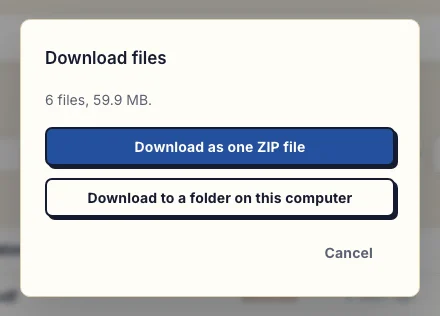
Real desktop dialog on the business client page, with fictional Ledger & Oak and Maple & Vine Bistro data. Inspect the dialog at full size.
What you can download
- One client. All their files, or only the ones you tick in the file list.
- The whole business. Every client at once, each in its own folder. This is for the account owner.
- The record without the files. Choose the export record alone when you need the history of a client's files and comments but not the documents themselves.
Every download carries an export.json for each client: the files with their names, dates and statuses, and the comments on each file. A download of several clients puts each one in its own folder with its own record, so two files with the same name never collide and one client's history never ends up in another client's record.
ZIP or folder
A ZIP is one file, and it works in every browser up to 2 GB or 2,000 files. That limit is not a storage limit. It keeps the archive in the plain ZIP format that older unzip tools and phones can open.
Above that, download into a folder. You pick a folder on your computer, and Droplana writes the files into it one by one. If you close the tab, the download continues where it stopped when you start it again, and a file that failed is retried without fetching the rest again. Folder download needs Chrome, Edge or another Chromium browser; Firefox and Safari do not support it.
What your clients can download
A client can download all their files or a selection from their own portal, with the same ZIP and folder options. Their download holds only their own files and comments. It never includes another client, and it never includes your invoices.
Your account data and activity
The owner can also export the account data as JSON: the business details, every client with its file records and comments, and your invoices. The activity trail, with logins, portal visits, uploads, downloads, deletions, comments and approvals, exports as CSV from Account → Activity.
Files are encrypted at rest. A download decrypts them on our server in Germany and sends them to you over an encrypted connection, so the decryption key stays on the server. The security page explains how that works and where it stops.
Leaving Droplana
If you move to another tool, the whole-business download gives you every file, sorted by client, with the comment history in a readable format. There is no automatic import into another product and no ongoing sync, so plan the move yourself. After cancellation, files stay available for a limited time, so export before that window closes.
Colleagues on Practice and Studio can download a client's files too; exporting the whole business stays with the owner. Team access lists what else is owner-only.
Included on every plan
Downloads and exports are included on Free and paid plans. Free covers 3 clients; its files expire 180 days after upload while the clients and their access stay active.
Free
€0/month
Just you
3 clients
2 GB storage
Up to 100 MB per file
Solo
€19/month
€190/year
Just you
Unlimited clients
50 GB storage
Up to 1 GB per file
Practice
€49/month
€490/year
Team size: 5
Unlimited clients
250 GB storage
Up to 2 GB per file
Studio
€99/month
€990/year
Team size: Unlimited
Unlimited clients
1 TB storage
Up to 5 GB per file
On Free, each file expires 180 days after upload. Your clients and their access stay active, so you can keep sharing new files. Active paid plans have no plan-imposed retention limit. Expiry settings, deletion and cancellation rules still apply; a persistent portal address does not guarantee permanent file availability. Team sizes include you. No setup fees or automatic overage charges. Prices exclude applicable tax.
Compare plan detailsQuestions about export and download
Can I download all of a client's files at once?
Yes. From the client's page, download all their files or a selection as one ZIP, up to 2 GB or 2,000 files. Each ZIP includes an export.json with the record of those files and their comments. Above that size, download into a folder in Chrome, Edge or another Chromium browser.
How do I export everything if I leave Droplana?
The owner can download the whole business: every client's files with one export.json per client, into a folder when it is larger than one ZIP allows. The account data export as JSON adds your business details and invoices, and the activity trail exports as CSV. There is no automatic migration into another product.
Can my clients download their own files?
Yes. A client can download all their files or a selection from their portal, with the same ZIP and folder options. They only ever get their own files and comments, never another client's and never your invoices.
Why does folder download need Chrome or Edge?
Folder download writes each file straight into a folder you choose, which uses a browser feature only Chromium browsers such as Chrome and Edge provide. Firefox and Safari can still use the ZIP download up to 2 GB or 2,000 files.