
Your colleagues work in the same client portals.
Invite the people in your firm with their own email address. They see the same clients, files and comments as you; billing and account settings stay with you.
Product demonstration: Screenshots show the actual app with fictional client data. They are not customer results.
Droplana is a client document portal: each client gets one private portal where you send documents and they send files back, with no account to create. On Practice and Studio, your colleagues work in those same portals. They see the clients, files and comments you see, so a client's documents do not depend on who is in the office that day.
See the team page
The owner of a fictional accounting firm has two colleagues on the team and one invitation waiting. Each colleague has their own email address and their own notification setting.
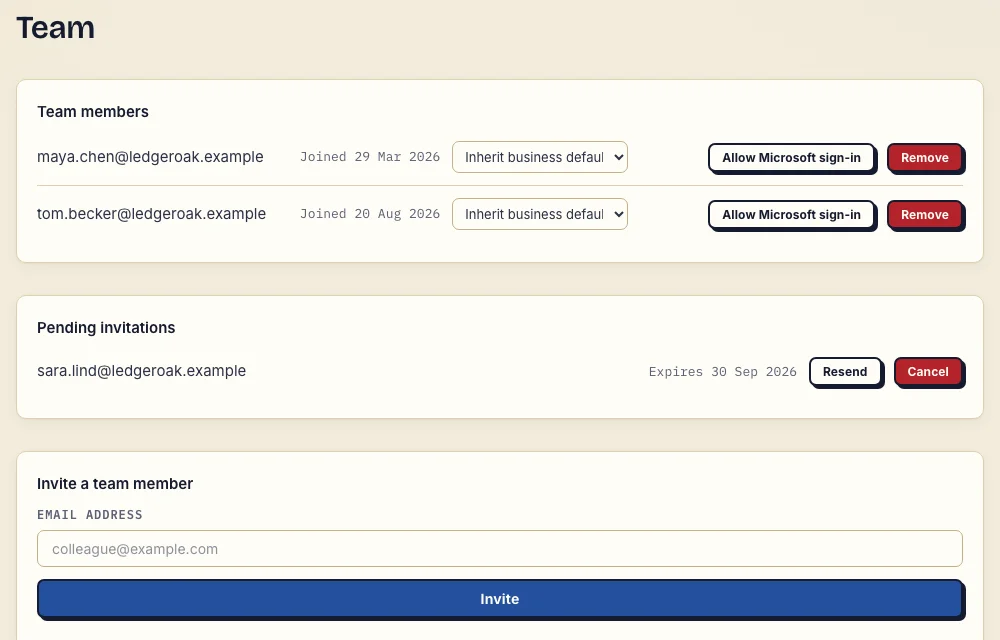
Real desktop team page, cropped, with fictional Ledger & Oak data. Inspect the team page at full size.
Seats per plan
A seat is one person, and the owner counts as one.
| Plan | Seats, owner included | Colleagues you can invite |
|---|---|---|
| Free | 1 | none |
| Solo | 1 | none |
| Practice | 5 | 4 |
| Studio | Unlimited | Unlimited |
There is no add-on for extra seats. A larger team means a higher plan. Pending invitations count toward the seats until they are accepted or expire.
Invite a colleague
Type their email address on the team page. They get an invitation that is valid for 24 hours, and accepting it opens your dashboard. After that, they sign in with that address, by an emailed link or with a Google or Microsoft account. There are no passwords. Someone can belong to several firms and still run their own business with the same address.
Each colleague chooses how often they get email about new comments, uploads and status changes: as it happens, hourly or in a daily digest. Until they choose, they follow your business default.
What colleagues can and cannot do
Colleagues do the client work, the same way you do:
- create and edit clients, and share portal access with them
- upload, download, delete and comment on files, and set Approved or Rejected
- set up document checklists and download a client's files
Some things stay with the owner:
- billing and the plan
- the business name, portal address and account settings, such as client uploads and access levels
- inviting and removing team members
- exporting the whole business and viewing the activity trail
- deleting the account
Where team access stops
Every colleague sees every client. There are no roles and no per-client assignment, so if some clients must stay with one person, Droplana does not fit that need. Client-to-client separation still holds: a client never sees another client's portal, but inside your business, colleagues are not separated from each other.
The owner can see who did what. The activity trail records logins, uploads, downloads, deletions, comments and approvals with the email of the person who did them. When someone leaves, remove them on the team page and their sessions end.
Pricing
Free
€0/month
Just you
3 clients
2 GB storage
Up to 100 MB per file
Solo
€19/month
€190/year
Just you
Unlimited clients
50 GB storage
Up to 1 GB per file
Practice
€49/month
€490/year
Team size: 5
Unlimited clients
250 GB storage
Up to 2 GB per file
Studio
€99/month
€990/year
Team size: Unlimited
Unlimited clients
1 TB storage
Up to 5 GB per file
On Free, each file expires 180 days after upload. Your clients and their access stay active, so you can keep sharing new files. Active paid plans have no plan-imposed retention limit. Expiry settings, deletion and cancellation rules still apply; a persistent portal address does not guarantee permanent file availability. Team sizes include you. No setup fees or automatic overage charges. Prices exclude applicable tax.
Compare plan detailsQuestions about team access
How many team members can I have?
Seats include the owner. Free and Solo have 1 seat, so you cannot invite anyone. Practice has 5 seats, so you can invite 4 colleagues. Studio has unlimited seats. There is no add-on for extra seats; a larger team means a higher plan.
Can I limit a colleague to certain clients?
No. Every team member sees all of your business's clients, files, comments and statuses. There are no roles and no per-client assignment. If some clients must stay with one person, Droplana's team access does not fit that need.
What can only the owner do?
Billing, the business name and portal address, account settings, inviting and removing team members, exporting the whole business, the activity trail and deleting the account. Team members do the client work: clients, files, comments, checklists and statuses.
Do team members need a password?
No. Each member signs in with their own email address, by an emailed link or with a Google or Microsoft account. There are no passwords in Droplana.