
One is a branded workspace. One is a document portal.
Clinked is a white-label client workspace: your domain, branded email, tasks, chat and a calendar. Droplana is a client document portal: each client gets one private portal to send and receive documents, with no account to create. Your logo goes in the header, but there is no custom domain, so if that is the requirement, this comparison is short.
Published by Droplana, one of the products compared. Clinked's plans checked on its own pages on September 21, 2026. The screenshot uses fictional data and is not a customer result.
The straightforward version
Clinked is a white-label collaboration portal. Its central promise is that the portal looks like yours. The Clinked plan comparison lists a custom domain, tasks, a shared calendar and chat on Standard, adds branded email and a Kanban board on Premium, and lists a white-label mobile app and a choice of data centre on Enterprise.
Droplana is a client document portal. Each client gets one private, persistent portal for two-way document exchange, with a document checklist, per-file comments, file status and in-browser PDF signing. Your logo replaces ours in the portal header, free on every plan. There is no custom domain, no accent colour, no branded email, no mobile app and no project management.
If white-labelling is a requirement, stop here and use Clinked. A logo in the header is not white-labelling, and we will not pretend the gap is smaller than it is.
Droplana vs Clinked side by side
| Clinked | Droplana | |
|---|---|---|
| Category | White-label collaboration workspace | Client document portal, two-way |
| Branding | Standard: custom domain; Premium: branded email | Logo in dashboard and portal headers on every plan; clean subdomain on paid plans |
| Mobile | Enterprise lists a white-label mobile app | Phone browser, with a Take photo button; no app to install |
| Client access | Member accounts; guest sharing without a portal login is a separate path | No accounts, no passwords; Strict verifies email on a new device |
| Workspace tools | Tasks, calendar and chat; Kanban on Premium | Documents, checklist with optional due dates, per-file comments |
| Pricing model | Tiers with included members; Standard lists 100 members and 1 TB | Flat per business, unlimited clients on paid plans |
| Hosting | Confirm region by plan; Enterprise lists data-centre choice | Hetzner in Germany, no region to choose; operated by an EU company in Croatia |
| PDF signing | Ask which provider your plan connects to | In-browser, with a public verification page |
| Integrations and API | Ask for the exact connector on your plan | MCP server for AI assistants and automation tools, signed webhooks; no native connectors |
Clinked's tiers, features and prices change. Check clinked.com rather than relying on this page. Its pricing page shows several billing views, so no fixed price is quoted here.
Where Clinked is clearly the answer
Your clients must see your full brand. This is Clinked's whole proposition: a custom domain, branded email and, on Enterprise, an app under your name. Droplana puts your logo in the portal header and nothing more. For an agency, a fund or any firm where the portal is part of the client-facing product, that gap matters.
You want the workspace, not only the documents. Tasks, chat, a calendar and a Kanban board mean the client relationship can live entirely inside it. Droplana holds documents; conversation and project work stay in your own tools.
You need ready-made connectors or an app. Droplana has no native connector to other products, no app-store listing and no native app. An AI assistant or automation tool can connect through its MCP server, and webhooks can notify your own systems, but if a specific product must be connected out of the box, that is a real limitation, not a style choice we can argue away.
Where Droplana is the better fit
Your clients will not create accounts. This is the sharpest difference. Clinked's guest sharing lets occasional collaborators reach files without a portal login, so there is a lighter path. But the full portal is built on member accounts, and the guest path is the exception, not the model.
Droplana has no client accounts on any plan. The client opens their link and, at the default Strict level, confirms with an email magic link or a Google or Microsoft account linked to their address. The browser is then remembered for 90 days. There is no password to create, forget or reset. For clients who will not adopt new software, a common case in accounting, legal and broking work, that removes what they resist.
Your team is small and your client list is not. Clinked's tiers bundle a number of included members, a structure aimed at organisations with many people inside the workspace. Ask Clinked how your staff and your clients count toward members before you compare. Droplana is flat per business with unlimited clients: for three staff serving 80 clients, Practice costs EUR49/month or EUR490/year plus tax, with five seats and 250 GB.
You want one region, from an EU operator. On Clinked, the data location depends on your plan and the region you choose, so confirm it in the quote. Droplana stores files, comments and metadata on Hetzner infrastructure in Germany with no other region to pick, encrypted at rest with a key per file, and the contracting company is Ubique d.o.o., registered in Croatia. Whether that matters to you is a real question. Our post on what EU-hosted actually means explains how to tell the claims apart.
You want less, and want it obvious. Tasks, chat, calendars and boards help when a team uses them and add clutter when it does not. A portal a client opens once a quarter works best with two things in it: what you sent, and what you still need from them.
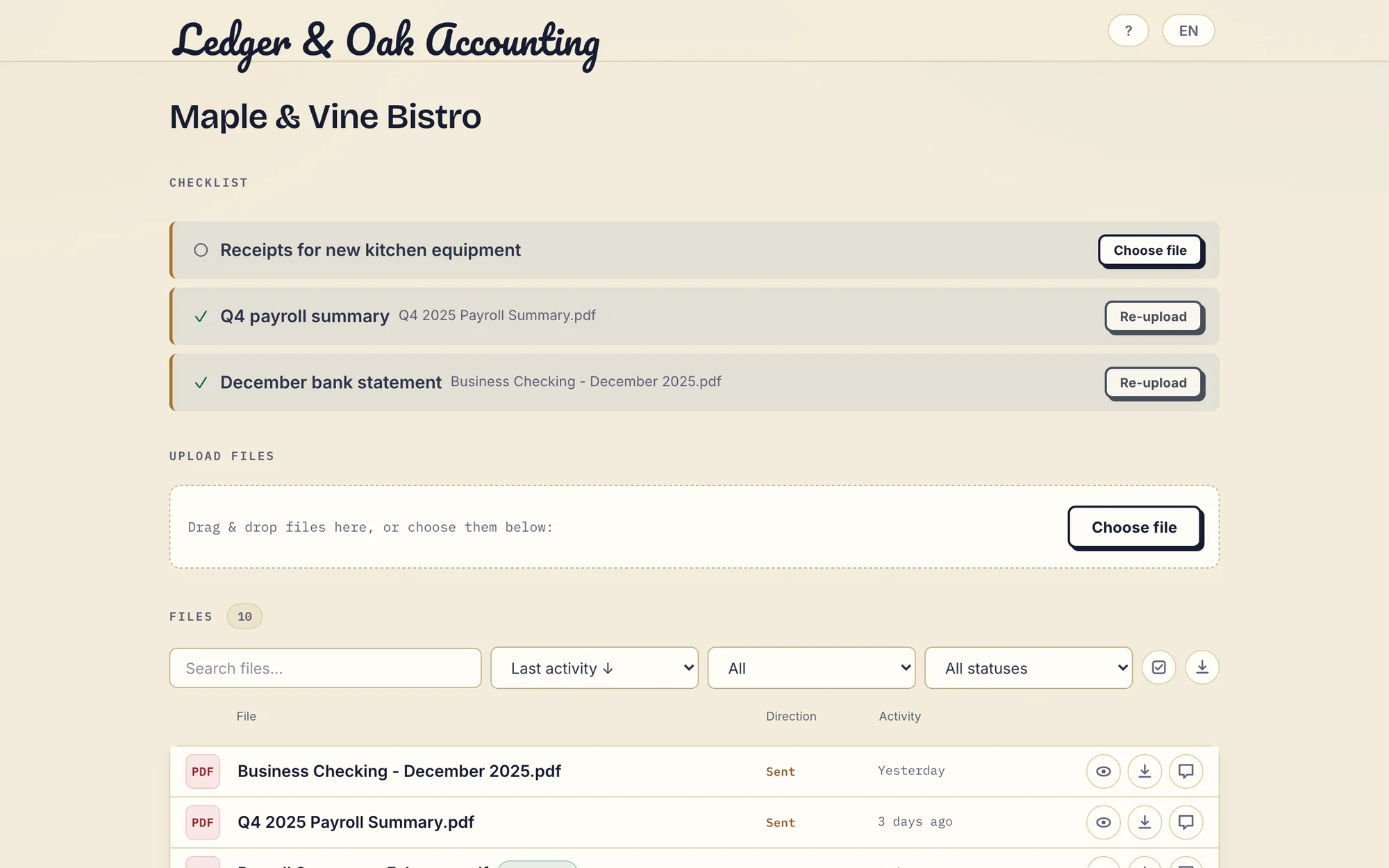
Real desktop portal with fictional Ledger & Oak Accounting and Maple & Vine Bistro data. The business logo sits above the client's checklist; the portal keeps Droplana styling and a small Droplana footer line. Open the full-size portal view.
On signing, specifically
Droplana signs in the browser. The business or the client types, draws or uploads a signature and places it on the page. The signed PDF is saved as a new file next to the original, with a caption and a QR code. Every signature is recorded on the server with who signed, when and from what IP, and a public verification page lets anyone check the record and compare the file's hash. Signing needs an identified session: a client holding only a link must verify their email once first.
That is included on every plan, and the public verification page is a real difference. It is also not a qualified or certificate-based electronic signature. If you need a qualified signature, ask Clinked which signing provider it connects to on your plan; that route is the better one for you.
What Droplana does not do
- No white-labelling. Logo only; no custom domain, accent colour, branded email or app.
- No workspace tools. No tasks, chat, calendar, Kanban, CRM or billing.
- No native connectors or app-store listings.
- No permission roles. Every team member can access every client.
- Due dates, not workflow. Checklist items can have optional due dates. A due-date reminder is prepared two days before and on the date, and reaches the client with their next email, which can be later that day or the next day. Separately, an unfinished checklist can nudge the client after 7 days of inactivity and escalate to you after 14.
- Not an archive. Free keeps each file for up to 180 days after upload. Active paid plans have no plan-imposed retention limit, but a portal is not long-term archival storage.
Who should pick which
Clinked if your brand must be on the portal; you want the client relationship to live in one workspace; you need integrations or an app; or you want a choice of hosting region.
Droplana if account creation is what your clients resist; your team is small next to your client list; you want one named EU hosting location and an EU operator; or you want a document layer beside the tools you already have, not a workspace to move into.
The accounting practices page and the legal page show the per-client structure in daily use, and the client portal guide covers wider buying criteria.
Questions before you choose
Does Droplana offer white-labelling like Clinked?
No. Every Droplana plan supports a business logo in the dashboard and portal headers, and paid plans get a clean subdomain slug. There is no custom domain, accent colour, branded email or branded mobile app, and the footer keeps a small Droplana line. Clinked's plan page lists a custom domain on Standard, branded email on Premium and a white-label mobile app on Enterprise.
How do clients get in, compared with Clinked?
Clinked portals use member accounts, with guest sharing as a separate path for files shared without a portal login. Droplana clients never create an account or password. Strict mode, the default, verifies their email on a new device and remembers the browser for 90 days; Controlled allows one-time or email magic links; Relaxed also allows permanent links.
How is Clinked priced compared with Droplana?
Clinked prices by plan tier with an included number of members and storage; its Standard plan lists 100 members and 1 TB. Confirm how your staff and clients count as members. Droplana is flat per business with unlimited clients on paid plans: Solo 19 EUR, Practice 49 EUR and Studio 99 EUR per month plus tax, with annual billing at ten months' price.
How does Droplana signing differ from Clinked's?
Droplana signs PDFs in the browser. An identified business user or client types, draws or uploads a signature; a new signed PDF is saved next to the original, and a public verification page shows who signed, when and from what IP, with a file-hash check. It is not a qualified or certificate-based signature. If you need one, ask Clinked which signing provider it connects to on your plan.
Plans and limits
Paid plans include unlimited clients: Solo EUR19/month or EUR190/year, Practice EUR49/month or EUR490/year, Studio EUR99/month or EUR990/year, plus tax. Free covers 3 clients, 2 GB and files up to 100 MB. Each paid storage add-on costs EUR15/month or EUR150/year plus tax, adds 500 GB and raises the file limit to 5 GB.
The tools you need, on every plan.
Share files, leave comments, request documents with checklists and sign PDFs in your browser. Your logo is included too.
Clients never pay or create an account. EU hosting, encryption and data export included.
Save 2 months with annual billing
Free Start here
For your first 3 clients
€0/monthNo credit card required
- Just you
- 3 clients
- 2 GB storage
- Up to 100 MB per file
- Files kept for 6 months
Solo
For independent professionals
€19/month+ tax
€190/year+ tax
- Just you
- Unlimited clients
- 50 GB storage
- Up to 1 GB per file
- Email support
Practice
For small firms
€49/month+ tax
€490/year+ tax
- Team size: 5
- Unlimited clients
- 250 GB storage
- Up to 2 GB per file
- Priority support
Studio
For growing teams
€99/month+ tax
€990/year+ tax
- Team size: Unlimited
- Unlimited clients
- 1 TB storage
- Up to 5 GB per file
- Priority support
- Personal setup call
On Free, each file expires 180 days after upload. Your clients and their access stay active, so you can keep sharing new files. Active paid plans have no plan-imposed retention limit. Expiry settings, deletion and cancellation rules still apply; a persistent portal address does not guarantee permanent file availability. Team sizes include you. No setup fees or automatic overage charges. Prices exclude applicable tax.
Compare plan details
| Included | Free | Solo | Practice | Studio |
|---|---|---|---|---|
| Team size | Just you | Just you | 5 | Unlimited |
| Clients | 3 | Unlimited | Unlimited | Unlimited |
| Storage | 2 GB | 50 GB | 250 GB | 1 TB |
| Maximum file size | 100 MB | 1 GB | 2 GB | 5 GB |
| File retention | 180 days from upload | No limit | No limit | No limit |
| Your Droplana address | Includes a random suffix | Your chosen name | Your chosen name | Your chosen name |
| Data Processing Agreement | Standard | Standard | Countersigned available | Countersigned available |
| Support | Priority | Priority | ||
| Personal setup call | Not included | Not included | Not included | Included |
Need more storage?
Add 500 GB for €15/month + tax, or €150/year + tax. Each storage add-on also raises your maximum file size to 5 GB.
Available on all paid plans from your billing page. Add more than one for another 500 GB each. Your team size stays the same.
Related comparisons
If you want a portal platform with billing and contracts, see Droplana vs Assembly. For an all-in-one business platform with white-label options, see Droplana vs SuiteDash. Firms that need a document platform with many storage features can read Droplana vs ShareFile.