
The closest comparison on this site, so here is the honest version
Content Snare is document collection done properly: request lists, reminders and approvals. Droplana is a client document portal: each client gets one private portal to send and receive documents, with no account to create. Both can chase a client. What decides it is direction, jurisdiction and what happens after the documents arrive.
Published by Droplana, one of the products compared. Content Snare's pricing and security pages checked on September 23, 2026. The screenshots use fictional data and are not customer results.
Where these two overlap
Most comparison pages on this site describe two tools built for different jobs. This one does not. Content Snare is the nearest thing to a direct competitor Droplana has.
Both give the client a persistent place rather than a one-off link. Both work from a request list, so the client can see what is outstanding instead of guessing. Both send the client a reminder when nothing has happened.
If you are looking for the paragraph where we explain that Content Snare cannot chase clients, it is not here. It can, and that is its strongest feature. Droplana can too. Checklist reminders are on by default: a client with an incomplete checklist and no activity for seven days gets an email naming the items still missing, and at fourteen days the reminder goes to you instead of pestering someone who is clearly stuck. Checklist items can also have an optional due date. A due-date reminder is prepared two days before and on the date, and reaches the client with their next email, which can be later that day or the next day.
So the decision comes down to three other things.
One: direction
Content Snare is a collection tool. The arrow points from the client to you, and the product is shaped around that: request templates, question types, approvals, chasing. For a firm whose pain is purely intake, that focus is a strength.
Droplana is a two-way client portal. The same private space holds what the client sends you and what you send back: the engagement letter, the draft accounts, the report, the contract awaiting signature. Files carry per-file comments and a status, and PDFs can be signed in the browser by either side.
Ask what happens the day after the documents arrive. If the answer is "I do the work and email them a PDF", you run two systems and Content Snare covers one of them. If nothing leaves your desk, the distinction does not matter, and you should weigh the other two factors.
Here is the collection half in Droplana. An accounting client needs a bank statement, a payroll summary and equipment receipts. Two items have arrived; the receipts are still missing. The client can upload a file or photograph the paper with their phone.
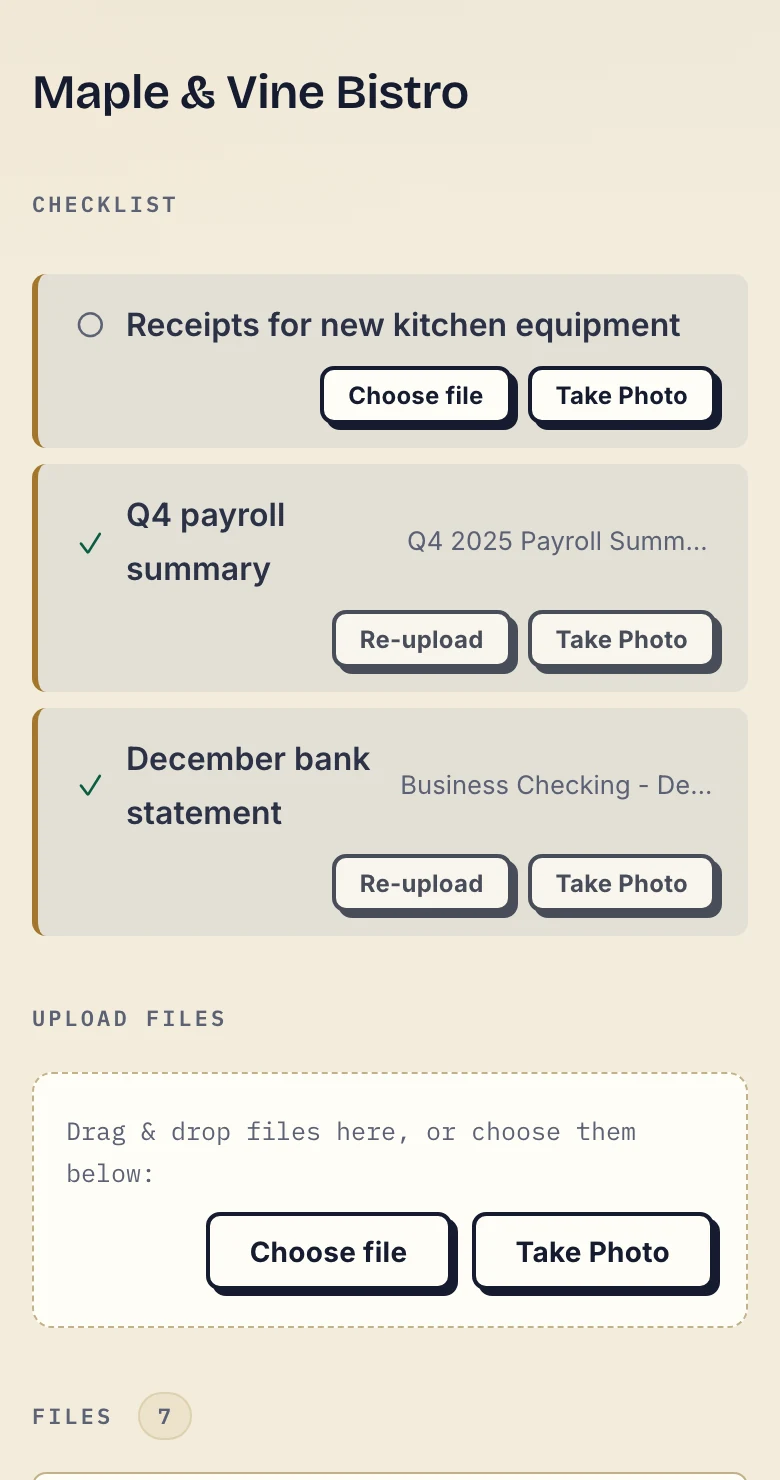
Real Droplana app with fictional data, cropped below the header. Open the checklist screenshot.
And the return half. In this client-side view, the client has sent two files and received work from the business, including a draft tax return. The Approved labels are file statuses, not signatures or proof of professional acceptance.
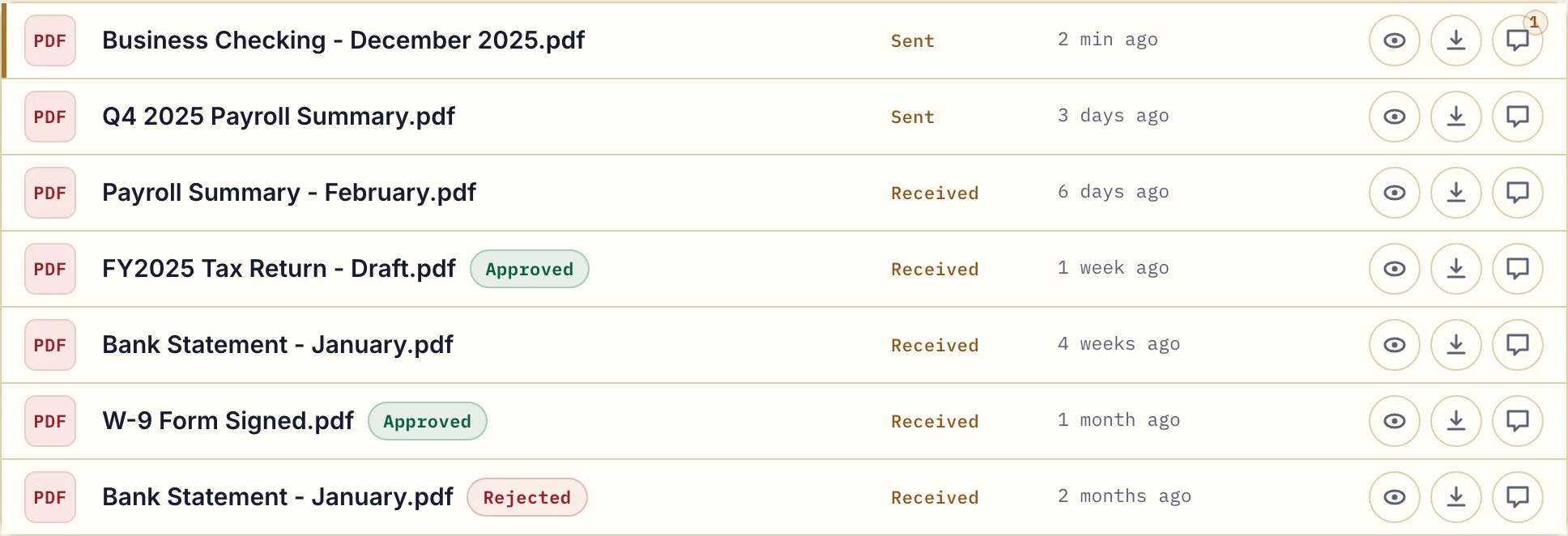
Client-side file list with fictional accounting data. Open the full-size file list.
Two: jurisdiction, which is either everything or nothing
Content Snare's security page says client data, request information and uploaded files are stored on AWS infrastructure in the United States. The company is Aktura Technology Pty Ltd. Hosting options change, so check with them directly.
Droplana is operated by an EU company, Ubique d.o.o. in Croatia, and stores files, comments and metadata on Hetzner infrastructure in Germany, encrypted at rest with a key per file. A Data Processing Agreement is available on every plan. The distinction worth understanding is between where data sits and who has legal reach over it. We explain it in what EU hosted actually means.
For many firms this is worth nothing. Nobody has asked, no client contract mentions it, and the documents are not especially sensitive. For a Dutch or German practice whose client's data protection officer has said US hosting is a problem, it is the whole decision, and no feature comparison will override it.
Three: what Content Snare has that we do not
Stated plainly, because this is the page most likely to be read by someone who should buy the other product.
- Integrations. Content Snare's pricing page lists Zapier on every plan. Droplana is not listed on Zapier and has no native connectors. It has an MCP server for AI assistants and automation tools, and signed webhooks, but no tool hands over a document's contents. If your plan ends with "and then it flows into my document management system", we are not on your shortlist.
- Custom branding. Content Snare offers it from the Plus plan. Droplana's logo upload is free on every plan, but there is no accent colour and no custom domain.
- Richer structured intake. Its question and form types go beyond a list of documents. A Droplana checklist is a list of documents with per-item status, not a form builder.
- Identity checks. Its security page describes identity verification through third-party services. Droplana has no identity verification beyond login.
Droplana vs Content Snare side by side
| Content Snare | Droplana | |
|---|---|---|
| Primary direction | Client to you | Both ways |
| Persistent client space | Yes | Yes, one private portal per client |
| Client account | Check registration and returning-device behaviour on your plan | None; Strict verifies email on a new device |
| Request list with per-item status | Yes | Yes, with reusable templates and optional due dates |
| Automated chasing | Yes, its headline feature | Yes: 7-day client nudge, 14-day escalation to you, due-date reminders |
| Corrections | Check how a client answers a request to fix a document | Per-file comments; the new copy is a separate upload |
| Sending files to the client | Not the main job | Yes, with comments and status per file |
| PDF signing | Check your plan | Any PDF, by either side, in the browser, with a public verification page |
| Integrations | Zapier on every plan | Not on Zapier; MCP server and signed webhooks |
| Custom branding | From the Plus plan | Logo only, free on every plan |
| Company and hosting | Aktura Technology Pty Ltd; AWS in the United States | Croatian (EU) company; Hetzner in Germany |
| Pricing shape | Tiers capped by users and active requests; Basic 42 USD/month for 2 users | Flat per business, unlimited clients on paid plans |
Content Snare's tiers and features change. Check contentsnare.com rather than trusting this page.
The client-side experience
Both products are trying to solve the same problem here, so it is worth being specific rather than claiming a win.
The failure mode in this category is well known: if the client cannot get in without a password and a short learning curve, they go back to email, and the tool is abandoned however good its feature list is.
Droplana's answer is that the client has no account at all. They open their private portal, the same address in month forty as in month one. What they confirm depends on the security level you set. Strict, the default, verifies their email on each new device and remembers the browser for 90 days. Controlled allows one-time or email magic links only. Relaxed also allows permanent links. A client can also sign in with a Google or Microsoft account linked to their email.
On a phone there is a Take photo button next to the upload button, so a client can photograph a paper payslip or an ID straight into the checklist item it belongs to. In accounting and broker work, that removes more friction than any other single thing.
What Droplana does not do
- No Zapier listing or native connectors. The largest gap against this competitor.
- Logo only, not full branding. No accent colour or custom domain.
- Not a form builder. The checklist asks for documents, not structured answers.
- No identity verification beyond login.
- No document editing or version history. Every team member can access every client; there are no restricted teams.
- Not a qualified e-signature. In-browser signing records who signed, when and from what IP, saves the signed PDF as a new file next to the original, and gives each signature a public verification page with a file-hash check. It is not certificate-based or qualified. See PDF signing.
- Not an archive. Free keeps each file for up to 180 days after upload. Active paid plans have no plan-imposed retention limit, but a portal is not long-term archival storage.
Who should pick which
Pick Content Snare if your work is intake and the documents do not need to travel back; you need collected material to flow into other systems; branded client pages matter to you; you want structured forms or identity checks; or hosting location has never come up in your practice.
Pick Droplana if you send and receive with the same clients over long relationships; you want in-browser signing on the documents that come back; an EU company with files in Germany is a requirement; or you want comments attached to the file instead of living in email.
Both are sensible purchases. If the honest answer is that you only collect, buy the collection tool. To test the difference, run one client through the whole loop in Droplana's Free plan: request, upload, correction comment, returned report.
The accounting practices page and the mortgage and credit brokers page show the per-client structure day to day, and the client portal guide covers how to evaluate this category.
Questions before you choose
Does Droplana chase clients for missing documents like Content Snare?
Yes. Checklist reminders are on by default and can be switched off per business. When a client has not acted on an incomplete checklist for seven days, they get an email naming the items still missing. After fourteen days the reminder goes to you instead, so a stuck client surfaces on your side. Checklist items can also carry optional due dates, with reminders prepared two days before and on the date. Chasing is Content Snare's headline feature; the difference is not that one follows up and the other does not.
What is the main difference between Content Snare and Droplana?
Direction. Content Snare is built to collect documents and information from clients, and it does that well. Droplana is a two-way portal: the same private space collects documents from the client and holds everything you send back, with per-file comments, file status and in-browser PDF signing. If your work ends when the documents arrive, that difference costs you nothing. If you also deliver accounts, reports or contracts back, it matters.
Where is each product hosted?
Content Snare's security page, checked on 23 September 2026, says client data and uploaded files are stored on AWS infrastructure in the United States; the company is Aktura Technology Pty Ltd. Droplana stores files, comments and metadata on Hetzner infrastructure in Germany and is operated by Ubique d.o.o., registered in Croatia, with a Data Processing Agreement on every plan. If a client's data protection officer has asked where documents sit and who has legal reach over them, that is a real difference. If nobody has asked, it is not.
Does Content Snare do anything Droplana does not?
Several things. Its pricing page lists Zapier on every plan, so collected material can flow into other tools; Droplana has no Zapier listing or native connectors. It offers custom branding from its Plus plan; Droplana's logo upload is free on every plan but has no accent colour or custom domain. Its question types for structured information are richer than a Droplana checklist, and it offers identity verification services. If any of those decide your purchase, it is the better fit.
How do Content Snare's user caps compare with Droplana's seats?
Content Snare's monthly plans, checked on 23 September 2026, run from Basic at 42 USD for 2 users and 20 active requests to Pro at 143 USD for 10 users and 100 active requests. Droplana limits seats, not requests or clients: Solo 19 EUR with 1 seat, Practice 49 EUR with 5 seats, Studio 99 EUR with unlimited team members, per month plus tax, with unlimited clients on every paid plan and a Free plan for 3 clients.
Plans and limits
Paid plans include unlimited clients: Solo EUR19/month or EUR190/year, Practice EUR49/month or EUR490/year, Studio EUR99/month or EUR990/year, plus tax. Free covers 3 clients, 2 GB and files up to 100 MB. Each paid storage add-on costs EUR15/month or EUR150/year plus tax, adds 500 GB and raises the file limit to 5 GB.
The tools you need, on every plan.
Share files, leave comments, request documents with checklists and sign PDFs in your browser. Your logo is included too.
Clients never pay or create an account. EU hosting, encryption and data export included.
Save 2 months with annual billing
Free Start here
For your first 3 clients
€0/monthNo credit card required
- Just you
- 3 clients
- 2 GB storage
- Up to 100 MB per file
- Files kept for 6 months
Solo
For independent professionals
€19/month+ tax
€190/year+ tax
- Just you
- Unlimited clients
- 50 GB storage
- Up to 1 GB per file
- Email support
Practice
For small firms
€49/month+ tax
€490/year+ tax
- Team size: 5
- Unlimited clients
- 250 GB storage
- Up to 2 GB per file
- Priority support
Studio
For growing teams
€99/month+ tax
€990/year+ tax
- Team size: Unlimited
- Unlimited clients
- 1 TB storage
- Up to 5 GB per file
- Priority support
- Personal setup call
On Free, each file expires 180 days after upload. Your clients and their access stay active, so you can keep sharing new files. Active paid plans have no plan-imposed retention limit. Expiry settings, deletion and cancellation rules still apply; a persistent portal address does not guarantee permanent file availability. Team sizes include you. No setup fees or automatic overage charges. Prices exclude applicable tax.
Compare plan details
| Included | Free | Solo | Practice | Studio |
|---|---|---|---|---|
| Team size | Just you | Just you | 5 | Unlimited |
| Clients | 3 | Unlimited | Unlimited | Unlimited |
| Storage | 2 GB | 50 GB | 250 GB | 1 TB |
| Maximum file size | 100 MB | 1 GB | 2 GB | 5 GB |
| File retention | 180 days from upload | No limit | No limit | No limit |
| Your Droplana address | Includes a random suffix | Your chosen name | Your chosen name | Your chosen name |
| Data Processing Agreement | Standard | Standard | Countersigned available | Countersigned available |
| Support | Priority | Priority | ||
| Personal setup call | Not included | Not included | Not included | Included |
Need more storage?
Add 500 GB for €15/month + tax, or €150/year + tax. Each storage add-on also raises your maximum file size to 5 GB.
Available on all paid plans from your billing page. Add more than one for another 500 GB each. Your team size stays the same.
Related comparisons
If documents currently arrive as attachments, see Droplana vs email. Accounting firms comparing document platforms can read Droplana vs SmartVault and Droplana vs ShareFile.