
Both of us think in lists. We disagree about everything around the list
Suralink is built for the prepared-by-client request list: a live, shared, per-item view of what the engagement team still needs, wired into how audit and assurance work runs. Droplana is a client document portal for general practices: each client gets one private portal to send and receive documents, with a checklist, no client account, a flat price per business and hosting in Germany.
Published by Droplana, one of the products compared. Suralink's product scope checked September 21, 2026. The screenshot uses fictional data and is not a customer result.
The idea both products are built on
Most tools in this category organise around folders. Both of these organise around a list, and that is a better model for anyone whose work waits on documents arriving.
The reason is completeness. A folder tells you what you have. A list tells you what you are missing, which is the thing that blocks the work. When the client can see the same list, the weekly "checking on those documents" email is often no longer needed, because the answer is already on their screen.
Suralink built a business on this for audit and assurance. The prepared-by-client request list is one of the most painful documents in professional services, and a live shared version beats a spreadsheet emailed back and forth.
Droplana's checklist is the same idea, aimed at a different buyer.
Where Suralink is clearly the right tool
If you are running audit or assurance engagements, buy the product built for them.
The request list in an audit is not a generic document list. It has engagement structure around it, it connects to the review of the evidence, and it sits inside a methodology the whole team follows. Suralink's platform overview covers request lists and wider review work, and its plan overview describes user assignment, approval workflows, audit trails and report delivery, with signing and API options. Confirm the connectors and entitlements in a demo.
Droplana has no engagement roles, no review routing and no connection to audit workpapers, so a Droplana checklist stands on its own. For an audit team that alone settles it.
Where Droplana fits instead
The buyer here is a general practice rather than an audit team: bookkeeping, tax, legal, brokerage, advisory. Firms with many clients, a modest headcount and a recurring set of documents per client.
For that firm the audit machinery is overhead. A three-person practice with two hundred clients does not need staged evidence review; it needs to know which clients still owe which documents.
Droplana's checklist gives you the same visible completeness: reusable templates so a standard document set is not retyped for every client, per-item status, optional due dates, and the client seeing exactly what is still outstanding whenever they open their portal. Reminders are on by default: after seven days with no activity the client gets an email naming the items still missing, and after fourteen the reminder goes to you, so a stuck client shows up on your side instead of being nudged again and again.
And it goes both ways. The same portal holds what you send back, the accounts, the report, the contract awaiting signature, with comments on each file and in-browser signing. For how to evaluate a client portal more generally, see our client portal guide.
Here is the list in a fictional bookkeeping portal: payroll and a bank statement have arrived, and the equipment receipt is still requested.
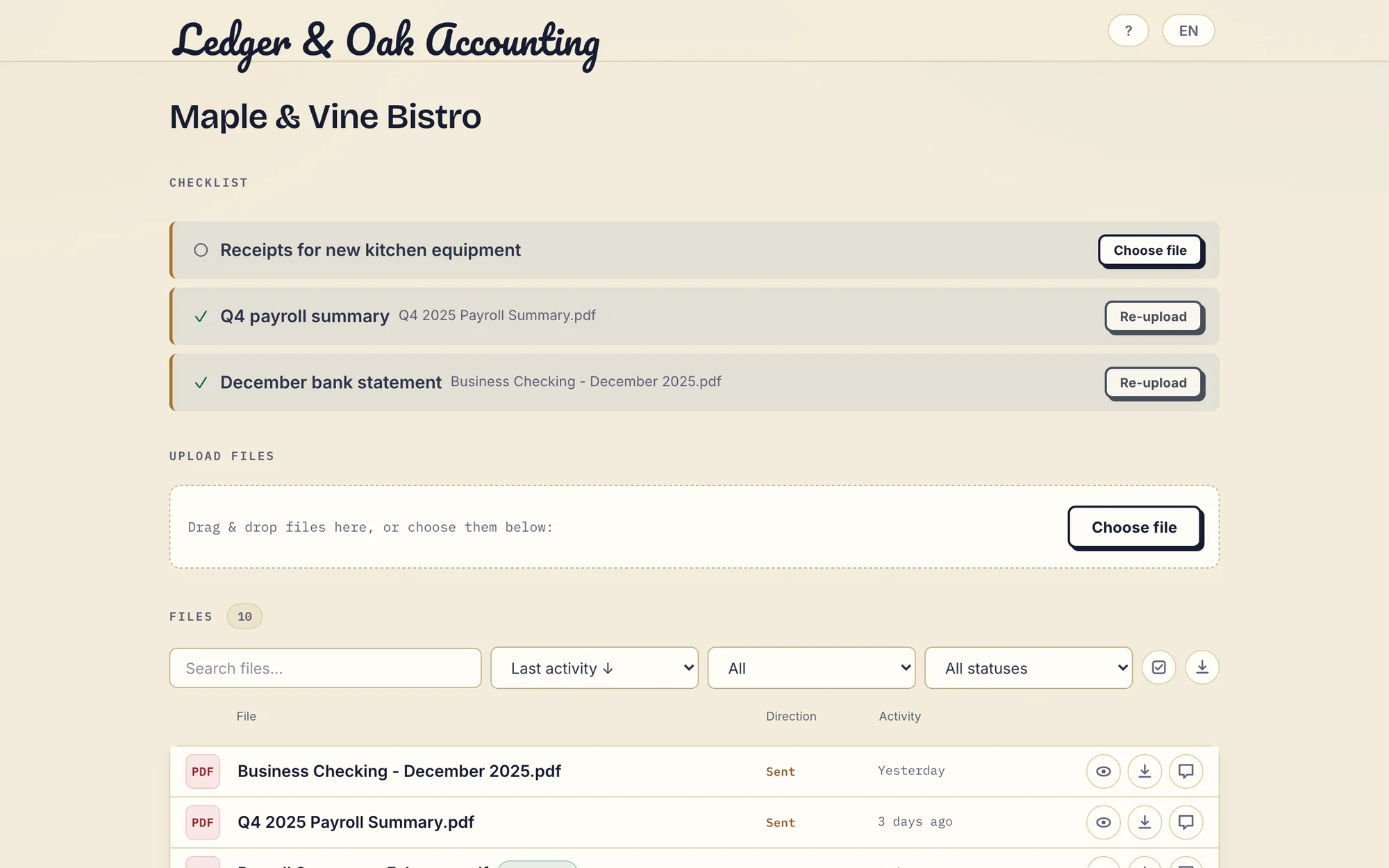
Real Droplana app with fictional Ledger & Oak Accounting and Maple & Vine Bistro data. Open the full-size screenshot.
Droplana vs Suralink side by side
| Suralink | Droplana | |
|---|---|---|
| Built for | Audit and accounting engagement teams | General professional practices |
| Core artefact | Request list with review workflow | Client portal with a document checklist |
| Per-item status the client sees | Yes | Yes |
| Reusable templates | Check in a demo | Yes |
| Due dates on items | Check deadline and escalation controls in a demo | Optional, with due and overdue state |
| Automated chasing | Check in a demo | On by default: 7-day client nudge, 14-day escalation to you |
| Staff assignment and staged review | Described in its plan overview | None |
| Integrations and API | API options described; confirm connectors | MCP server and signed webhooks; no workpaper connectors |
| Returning documents | Report delivery described | Files sent and received in the same portal |
| PDF signing | Signing options described | In the browser, with a public verification page |
| Client access | Confirm in a demo | No client account; Strict verifies email on a new device |
| Hosting | Confirm the service region | Hetzner, Germany |
| Pricing | Quote | Flat per business, unlimited clients |
Suralink's plans and features change. Check suralink.com rather than trusting a comparison page.
Price the work you need
Suralink did not publish a current numeric price when we checked, so ask for a quote. A useful brief: five staff, ten concurrent engagements, 100 requests per engagement and 200 GB of documents, plus the review, permission and integration features you need and any minimum commitment.
Droplana Practice is EUR49 a month or EUR490 a year plus tax for five seats including the owner, unlimited clients and 250 GB. Then ask whether the audit capability in the Suralink quote is capability you would use. For an audit team the answer is usually yes. For a bookkeeping practice it often is not.
What Droplana does not do
- No audit or engagement structure. A checklist is a list of documents, not a methodology. File approval and an activity log do not amount to audit coverage.
- No task assignment or staged review. Every team member can access every client.
- No workpaper or audit software connectors. Decisive against this competitor for audit teams.
- Logo only, not full branding. Your logo appears in the portal header on every plan, but there is no custom domain or accent colour.
- Not project management, general storage or an archive. Bulk downloads support ZIP up to 2 GB or 2,000 files; larger folder downloads need a Chromium browser.
- Not a qualified e-signature. In-browser signing records who signed, when, from what IP and with which login, keeps the original next to the signed copy, and gives every signature a public verification page with a file-hash check. It is not certificate-based or qualified.
Who should pick which
Pick Suralink if you run audit or assurance engagements; evidence has to be routed to assigned reviewers; the request list has to connect to your other audit tools; or you need audit-specific permissions.
Pick Droplana if you are a general practice rather than an audit team; your client count grows faster than your headcount; you send documents back as often as you request them; you want in-browser signing on what comes back; or you need an EU company on German infrastructure.
For what this looks like in a specific practice, see the accounting practices page, the legal page or the financial advisers page.
Questions before you choose
Does Droplana replace audit request management?
Not when the engagement needs assigned reviewers, staged approvals, workpaper connections or audit-specific permissions. Droplana provides a simpler document checklist and two-way exchange portal, with no workpaper connections and no task assignment.
Does the Droplana checklist support due dates?
Yes. Checklist items can have optional due dates and show a due or overdue state. A reminder is prepared two days before and on the date, and reaches the client with their next email, which can be later that day or the next day. The business can switch these reminders off and the client can opt out. They are not configurable workflow automation.
How does pricing compare with Suralink?
Suralink did not publish a current numeric price when we checked on 21 September 2026, so ask for a quote for your team, engagements and required features. Droplana is flat per business with unlimited clients: Practice costs 49 EUR a month or 490 EUR a year plus tax for five seats including the owner and 250 GB.
Do clients need a Droplana account?
No. Clients do not create an account or password. Strict mode, the default, verifies email on a new device, and the verified browser is remembered for 90 days. An identified session is required for PDF signing. A persistent portal address does not promise permanent file retention.
Plans and limits
Paid plans include unlimited clients: Solo EUR19/month or EUR190/year, Practice EUR49/month or EUR490/year, Studio EUR99/month or EUR990/year, plus tax. Free covers 3 clients, 2 GB and files up to 100 MB, and keeps each file for up to 180 days after upload. Each paid storage add-on costs EUR15/month or EUR150/year plus tax, adds 500 GB and raises the file limit to 5 GB.
The tools you need, on every plan.
Share files, leave comments, request documents with checklists and sign PDFs in your browser. Your logo is included too.
Clients never pay or create an account. EU hosting, encryption and data export included.
Save 2 months with annual billing
Free Start here
For your first 3 clients
€0/monthNo credit card required
- Just you
- 3 clients
- 2 GB storage
- Up to 100 MB per file
- Files kept for 6 months
Solo
For independent professionals
€19/month+ tax
€190/year+ tax
- Just you
- Unlimited clients
- 50 GB storage
- Up to 1 GB per file
- Email support
Practice
For small firms
€49/month+ tax
€490/year+ tax
- Team size: 5
- Unlimited clients
- 250 GB storage
- Up to 2 GB per file
- Priority support
Studio
For growing teams
€99/month+ tax
€990/year+ tax
- Team size: Unlimited
- Unlimited clients
- 1 TB storage
- Up to 5 GB per file
- Priority support
- Personal setup call
On Free, each file expires 180 days after upload. Your clients and their access stay active, so you can keep sharing new files. Active paid plans have no plan-imposed retention limit. Expiry settings, deletion and cancellation rules still apply; a persistent portal address does not guarantee permanent file availability. Team sizes include you. No setup fees or automatic overage charges. Prices exclude applicable tax.
Compare plan details
| Included | Free | Solo | Practice | Studio |
|---|---|---|---|---|
| Team size | Just you | Just you | 5 | Unlimited |
| Clients | 3 | Unlimited | Unlimited | Unlimited |
| Storage | 2 GB | 50 GB | 250 GB | 1 TB |
| Maximum file size | 100 MB | 1 GB | 2 GB | 5 GB |
| File retention | 180 days from upload | No limit | No limit | No limit |
| Your Droplana address | Includes a random suffix | Your chosen name | Your chosen name | Your chosen name |
| Data Processing Agreement | Standard | Standard | Countersigned available | Countersigned available |
| Support | Priority | Priority | ||
| Personal setup call | Not included | Not included | Not included | Included |
Need more storage?
Add 500 GB for €15/month + tax, or €150/year + tax. Each storage add-on also raises your maximum file size to 5 GB.
Available on all paid plans from your billing page. Add more than one for another 500 GB each. Your team size stays the same.
Related comparisons
Other request-list tools are compared in Droplana vs Content Snare and Droplana vs FileInvite. For tax return delivery, see Droplana vs SafeSend Returns.