
Renewals and claims run on documents you have to chase
A renewal needs a proposal form and proof of no claims. A claim needs photos, receipts and a signed statement, often from someone having a bad week. Give every client one private portal to send it all in, with nothing to sign up for, and send schedules back the same way.
Droplana is a client document portal for insurance brokers. Each client gets one private, persistent portal where they send proposal forms, claim photos and signed mandates, and where you return schedules, certificates and correspondence. Clients need no account and no app.
Photographs, straight from the phone
Damage photos, a receipt, a signed page, a licence. The portal's Take Photo button opens the camera and the image lands under that client's name, not in a messaging app thread you cannot search later.
A checklist the client can see
Set the list once per case: proposal form, proof of no claims, survey, licence. The client sees what is still missing, and if nothing happens for 7 days, Droplana emails them the list.
The portal survives the renewal
Same portal, same link, next year. On an active paid plan, last year's schedule is still there under that client's name unless you set an expiry or delete it.
Signed mandates, in-browser
Send a mandate or declaration and the client signs it in the portal: type, draw or upload a signature. The signed copy carries a caption and a QR code that links to a public verification page.
Isolated per client
Each client sees only their own portal. There is no shared folder permission somebody has to keep correct.
Stored in Germany
Files, comments and metadata are stored on Hetzner infrastructure in Germany, with files encrypted at rest per file. Operated by an EU company, with a DPA on every plan.
Two document problems, not one
Broking has two distinct document flows and they fail differently.
Renewals are predictable and repetitive. Every year, the same clients need the same handful of things, at roughly the same time, and every year some of them are late. The failure mode is volume: a hundred renewals in a season, each needing two or three items, chased individually by email. Nothing about any one of them is hard. All of them together take a large part of somebody's week.
Claims are urgent and messy. A client has had an accident, a flood, a break-in. They are stressed, they are on their phone, and they have twenty photographs, a crumpled receipt and a police reference number. The failure mode here is intake: the photographs arrive over WhatsApp at four different times, the receipt is a photo of a screen, and three weeks later nobody can reconstruct what was sent when.
The two flows pull in opposite directions. Renewals want structure and reminders. Claims want the lowest possible friction at the moment the client has the evidence in their hand.
A per-client portal handles both, because the structure is on your side and the client has almost nothing to learn. The checklist and its reminders give renewals their shape. The Take Photo button makes claim evidence quick to send. Both land in the same place, under the same client, in date order. For the wider view of what a client portal is and how to evaluate one, see our client portal guide.
An insurance broker client portal at renewal time
Send Renewal - Document request.pdf explaining the information you need. The client returns Renewal - Equipment list.pdf through the same portal. Review it, comment on any missing details and upload the new schedule when it is ready to share.
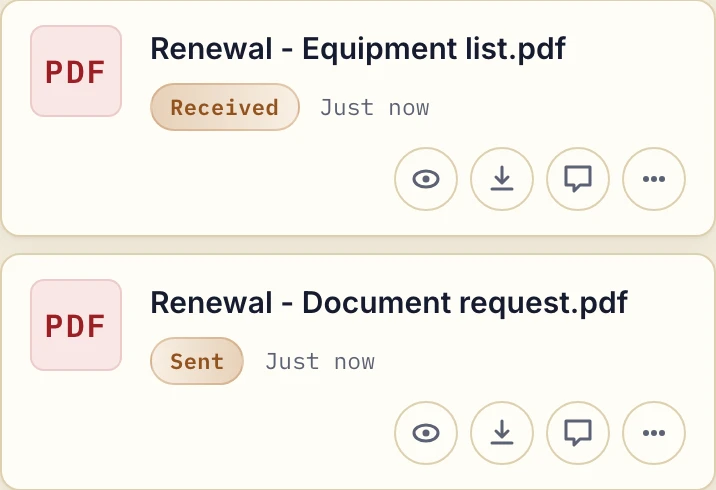
Actual product view with fictional renewal documents.
Use a document checklist for the proposal form, proof of no claims, survey or other inputs your process needs, or reuse a saved template for the same kind of renewal. The portal does not run your renewal diary; the checklist covers the documents for this case.
When claim evidence arrives from a phone
A client can upload existing damage photographs and receipts, or tap Take Photo to capture paper. Add a comment to the specific file when a page is cropped or an image needs more context. Marking a file Rejected keeps it in the portal with your correction request; it does not reject the claim.
Send certificates and correspondence back through the same portal. For a returning client, put dates and policy references in the filenames, because there are no separate claim or policy records inside the portal.
Why brokers use Droplana
Reminders you don't write
If a client does nothing for 7 days while checklist items are missing, they get one email naming those items. If another 7 days pass, the reminder comes to you instead, so your calls go to the clients who are stuck. Reminders are on by default.
The phone is the camera and the scanner
Clients do not own scanners and they do not want to install anything. The portal's Take Photo button opens the phone camera. This matters most at the worst moment: a client standing next to a damaged car is far more likely to send photos if it takes a tap, not an account.
Evidence arrives with a record attached
Every file lands under the client's name with a timestamp. When a claim is queried four months later, the question "when did they send the receipt?" has an answer that does not involve scrolling a chat history.
Schedules and certificates go back the same way
Policy schedules, certificates and correspondence go into the same portal instead of out as email attachments that a corporate filter eats. Per-file comments let you add the one line of context a document needs.
A brokerage, not only one broker
Practice has a team size of 5, including the owner. Studio has unlimited team size. The account owner can view and export (CSV) an activity trail of logins, portal visits, uploads, downloads, deletions, comments and approvals.
Access ends when the relationship does
Revoke a client's portal access and it takes effect immediately. The files stay with your business.
Claim files and personal data
A claim file is a dense pile of personal data, and a personal injury claim can include medical evidence. Here is what Droplana provides, so you can check it against your own obligations:
- Storage in Germany. Files, comments and metadata sit on Hetzner infrastructure in Germany, under opaque randomly generated identifiers. They are never named after a client, a filename or its contents, and never exposed on the public internet.
- Encrypted at rest, per file. Every file is encrypted with a key derived specifically for it. This protects against a breach of the storage platform. It does not protect against a compromise of the application host, where the master key lives alongside the storage credentials, and we would rather state that than imply more.
- DPA on every plan, countersigned on Practice and Studio. It leaves the decision on special-category data, such as health information, to your firm.
- EU providers. Hetzner in Germany for storage, Brevo in France for mail, Creem in Estonia for payments. Mail and payment providers never receive file contents.
Storage location is one input to your decision, not the whole answer. Our security page sets out the storage and encryption detail, and GDPR-compliant file sharing with clients covers the questions to ask of any tool.
Where Droplana is not the answer
- It is not a broking or policy administration system. There is no quoting, no policy record, no claims handling, no commission tracking and no renewal diary.
- It has no connector to your back-office system, so nothing syncs automatically.
- Contacts added to one client share that client's portal, and your team members can work across all clients. There are no case-level or insurer-specific access roles.
- In-browser signing records who signed, when, from where and with which login, with a public verification page, but it is not a qualified or certificate-based electronic signature. Where a hard legal signing requirement applies, use a dedicated provider, or have the client photograph the signed paper original.
- It is not archival storage. Storage is capped per plan with no overage billing: when the limit is reached, new uploads stop and existing files stay accessible.
Insurance brokers often share clients with mortgage brokers and financial advisors, who collect many of the same documents.
Check our simple pricing (or start free)
Droplana is priced per business, not per client, with unlimited clients on every paid plan. Free includes 3 clients, 2 GB storage and 100 MB per file, and keeps each file for up to 180 days. Solo costs €19/month plus tax with 50 GB and 1 GB per file. Practice is €49/month plus tax with 250 GB and 5 team members including the owner. Each Storage add-on adds 500 GB and raises the file limit to 5 GB.
The tools you need, on every plan.
Share files, leave comments, request documents with checklists and sign PDFs in your browser. Your logo is included too.
Clients never pay or create an account. EU hosting, encryption and data export included.
Save 2 months with annual billing
Free Start here
For your first 3 clients
€0/monthNo credit card required
- Just you
- 3 clients
- 2 GB storage
- Up to 100 MB per file
- Files kept for 6 months
Solo
For independent professionals
€19/month+ tax
€190/year+ tax
- Just you
- Unlimited clients
- 50 GB storage
- Up to 1 GB per file
- Email support
Practice
For small firms
€49/month+ tax
€490/year+ tax
- Team size: 5
- Unlimited clients
- 250 GB storage
- Up to 2 GB per file
- Priority support
Studio
For growing teams
€99/month+ tax
€990/year+ tax
- Team size: Unlimited
- Unlimited clients
- 1 TB storage
- Up to 5 GB per file
- Priority support
- Personal setup call
On Free, each file expires 180 days after upload. Your clients and their access stay active, so you can keep sharing new files. Active paid plans have no plan-imposed retention limit. Expiry settings, deletion and cancellation rules still apply; a persistent portal address does not guarantee permanent file availability. Team sizes include you. No setup fees or automatic overage charges. Prices exclude applicable tax.
Compare plan details
| Included | Free | Solo | Practice | Studio |
|---|---|---|---|---|
| Team size | Just you | Just you | 5 | Unlimited |
| Clients | 3 | Unlimited | Unlimited | Unlimited |
| Storage | 2 GB | 50 GB | 250 GB | 1 TB |
| Maximum file size | 100 MB | 1 GB | 2 GB | 5 GB |
| File retention | 180 days from upload | No limit | No limit | No limit |
| Your Droplana address | Includes a random suffix | Your chosen name | Your chosen name | Your chosen name |
| Data Processing Agreement | Standard | Standard | Countersigned available | Countersigned available |
| Support | Priority | Priority | ||
| Personal setup call | Not included | Not included | Not included | Included |
Need more storage?
Add 500 GB for €15/month + tax, or €150/year + tax. Each storage add-on also raises your maximum file size to 5 GB.
Available on all paid plans from your billing page. Add more than one for another 500 GB each. Your team size stays the same.
Questions before you start
Can clients send claim photographs from their phone?
Yes, when client uploads are enabled. Clients choose existing photos or tap Take Photo in their portal to photograph damage, a receipt or a signed page. There is no scanner and no app to install. Droplana stores the files; it does not verify the evidence or assess the claim.
Do clients need an account or a password?
No. Each client opens a link to their own portal. Under the default Strict setting they confirm their email on a new device, by magic link or by signing in with Google or Microsoft, and the browser is then remembered for 90 days. There is nothing to sign up for and no password to lose.
Can I tell a client exactly which documents are still missing?
Yes. You set a document checklist per client, such as proposal form, proof of no claims, licence or survey. The client sees it in their portal, with the items that have arrived marked off. If the client does nothing for 7 days while items are missing, they get an email naming those items, and after 14 days the reminder comes to you instead.
Will last year's documents still be there at the next renewal?
On an active paid plan, yes, unless you set an expiry date or delete them. Paid plans have no plan-imposed file retention limit. Free keeps each file for up to 180 days from upload. A persistent portal address is not an archival backup, so keep your own required records.
Where are claim files stored, and who can see them?
Files, comments and metadata are stored on Hetzner infrastructure in Germany, and files are encrypted at rest with a key derived for each file. Each client sees only their own portal. Contacts added to one client share that portal, and your team members can work across all clients. A DPA is available on every plan.
Compared with what brokers use now
- Droplana vs Content Snare: another document collection tool with reminders, compared on direction and where data lives.
- Droplana vs FileInvite: request-based document collection compared with a permanent two-way portal.
- Droplana vs messaging apps: why claim photos over WhatsApp are hard to find later.
- Droplana vs email: what changes when renewal documents stop arriving as attachments.