
Client Onboarding Document Checklist (By Profession)
What to put on an onboarding document list, how to word each item so clients don't stall, and starting lists for accounting, mortgage advice and consulting.
A client onboarding document checklist tells your client what to send, which period it should cover and what makes each item complete. Keep it to the documents needed for the agreed work, with one clear place to return them.
Download the checklist and request examples
Download the one-page client document checklist (PDF), or use the editable checklist text. No signup is required to use these resources. The PDF is for printing; the text version is for copying and adapting.
The examples below are manual starting points. They are not official document lists, compliance advice or automatic imports into Droplana.
| Template | Use it for |
|---|---|
| Accounting document request | A month-end request with explicit periods and completeness criteria |
| Mortgage document request | A bounded applicant pack, adapted to the adviser's requirements |
| Consulting document request | Inputs needed before the first deliverable |
| Client portal invitation | Explaining the return location, access and first requested action |
Copy a short request and show what remains
Illustrative checklist to adapt:
- [Document name] for [period], including [required pages].
- [Report name], revision [date], in [accepted format].
- [Supporting file] for [purpose]; tell [contact] if it is unavailable.
Please upload these items to [portal link] by [date]. Use the email address we have recorded for you to verify access on a new device; no client account or app is needed. Clear photos are acceptable for [specified items]. We will review the files and ask for any correction on the relevant document. [Name the business team who can access the files.]
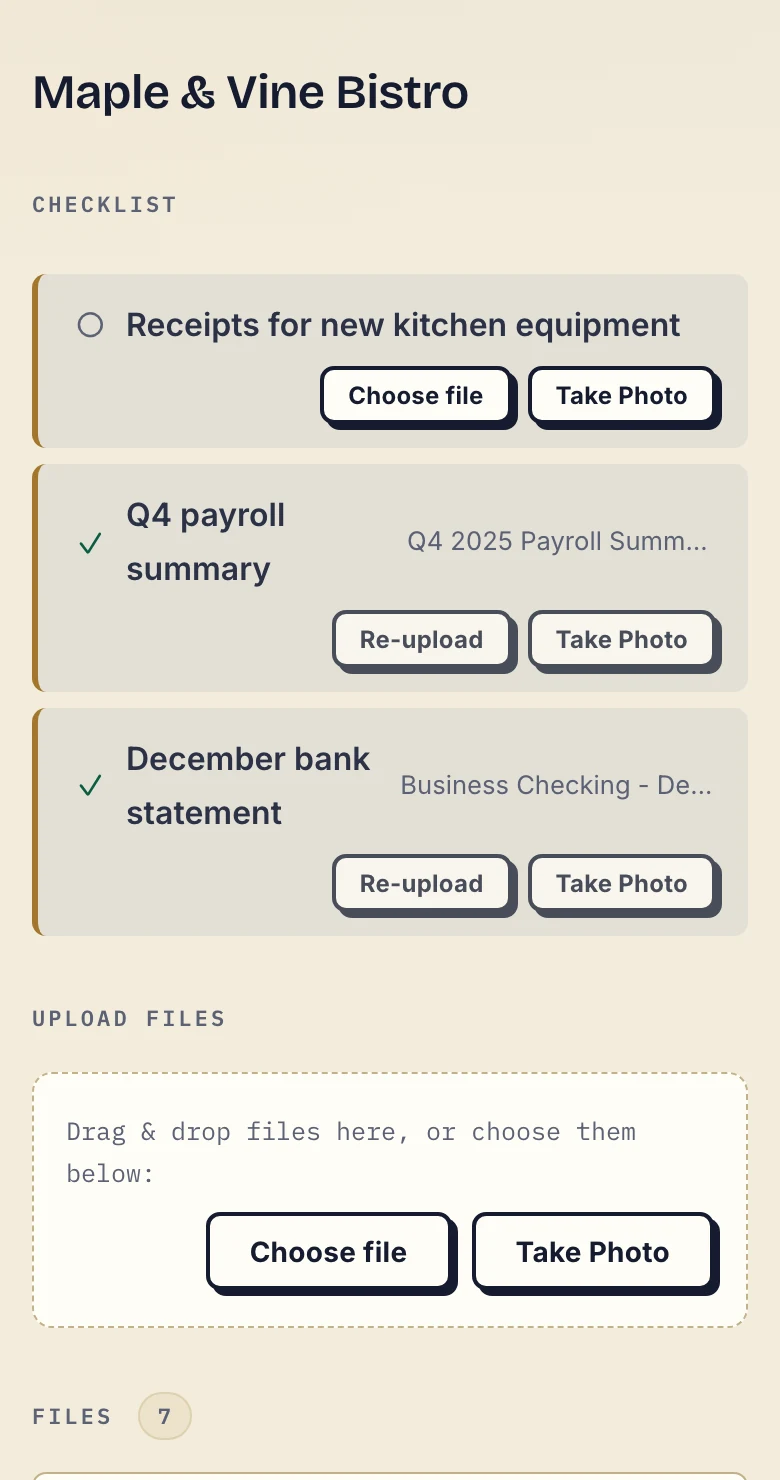
Product demonstration with fictional data. The fictional Maple & Vine Bistro client can see supplied documents and the outstanding receipt request.
A supplied item is not proof that all pages are present or that its contents are correct.
What makes a useful client onboarding document checklist?
1. Ask for a document you will use
Start with the work you have agreed to do. For each item, finish the sentence: “We need this to…” If you cannot explain its purpose, check whether it belongs in the request.
Do not copy another firm's identity, financial or personnel requirements without checking whether they apply. The required documents and signing methods depend on the engagement and the relevant professional or legal requirements.
2. Name the period and the pages
“Bank statement” leaves several questions unanswered. Which account? Which month? Every page, or a particular transaction?
A clearer request is: “The statement for [account] covering [start date] to [end date], including every page.” Replace the brackets before sending it. Use the client's words rather than internal abbreviations.
For a report or presentation, state which date or revision you need. If you accept more than one format, name the options. The client should not have to guess whether the file they found is the right one.
3. Explain whether a phone photo is suitable
A photo can be a practical way to send paper, but it is not suitable for every request. Where you accept one, ask for good light, readable text, every page and all edges visible. Check the result before treating the item as complete.
If the recipient requires an original, a particular file format or a specific signing method, say so. Uploading a photograph does not validate the document or meet that requirement by itself.
4. Identify the item held by someone else
A previous adviser, bank or internal team may hold one of the requested files. Flag that dependency and ask the client to start it first. Give them a way to tell you that it is unavailable or delayed.
State your requested date where appropriate, then explain what you will do after reviewing the uploads. Avoid promising a completion time for a task you have not measured.
Starting requests for three types of work
Accounting: close a month with the required inputs
For a fictional month-end request, a firm might ask for statements for the agreed accounts, purchase receipts, a sales report and relevant payroll inputs. Each item needs a period and a description of what counts as complete.
The accounting template leaves those decisions to the firm. It also includes a check for missing pages and a reminder to return the agreed report. Requesting the next month's documents is a new manual action; the template does not create a recurring workflow. There is no ready-made connector to accounting software, but signed webhooks can tell your own systems when a checklist item or a whole checklist is completed.
Mortgage advice: make the missing item specific
A broker might need income evidence, statements and deposit documents for an application. The appropriate period and acceptable evidence must come from the adviser and the relevant requirements, not a generic internet list.
Before inviting people, decide whose documents belong in the client portal and who is allowed to access them. Do not assume that a portal provides separate applicant, joint-applicant and lender roles. Receiving a file is separate from identity checks, underwriting or submitting an application.
Consulting: request what the first deliverable needs
Start with the brief, relevant previous reports, the agreed data export and the people needed to clarify it. If another team must prepare an input, identify that dependency early.
Arrange system access through the proper access process. Do not ask the client to upload passwords, keys or access codes. Keep project tasks, meetings and editing in the tools that already handle them.
Send a clear invitation with the list
The invitation template explains the purpose, return location and first action. Replace every placeholder and describe your actual access setting before sending it.
Tell the client who on your business team can access their documents. State the applicable retention when it matters to the exchange. A stable portal address does not mean its files are kept forever.
In Droplana, clients do not create an account, choose a password or install an app. With the default Strict setting, they verify their email on a new device. Explain that step in the invitation so it is expected rather than surprising.
Where Droplana fits
Droplana gives each client a private portal for sending documents and getting files back. A document checklist shows requested uploads and the items still outstanding. You create it for the client; you decide what to ask for and check what arrives.
If a file needs correcting, leave a comment on that file. Re-uploading creates another file, so make revisions clear. A received file or a download is not proof of accuracy, reading or approval.
Checklist stall reminders are on by default and can be disabled by the business. After seven days of client inactivity while items remain unfulfilled, the client receives a nudge naming the missing items. After fourteen days, the reminder goes to the business. Optional item due dates have their own reminder, prepared two days before and on the date. It is not sent once the item is supplied, and it reaches the client with their next email, which can be later that day or the following day. The business or the client can switch it off. These fixed schedules are not configurable approval workflows or automatic monthly requests.
Free supports three clients, 2 GB total storage and files up to 100 MB. Each Free file expires 180 days after upload; the client and portal access remain. Solo costs €19/month or €190/year plus tax, with unlimited clients, 50 GB total storage, 1 GB files and one business seat. Active paid retention has no plan-imposed time limit, subject to expiry settings, deletion and cancellation.
Checklist questions
What should go on a client onboarding document checklist? Only the documents needed for the agreed work. Name each item, its period or version, the required pages and the accepted format. Explain where to send it and what happens after review.
Can clients send photographs of paper documents? Where a photo is suitable for the request, ask for readable text, every page and all edges visible. Follow any requirement for an original, a particular format or a specific signing method.
Does the template create a checklist automatically? No. These are printable and editable manual templates. In Droplana, the business creates the client's document checklist and decides which uploads are required.
For the actual request-and-upload steps, use the Droplana instructions. To try the exchange with one client, start with the Free plan.