
One starts with the conversation. One starts with the document
Liscio moves client communication out of email: secure messaging, web and mobile apps, requests and documents, for accounting firms. Droplana is a client document portal: each client gets one private portal to send and receive documents, with no account to create, and comments sit on the file. Both fight the same email thread.
Published by Droplana, one of the products compared. Liscio's features and pricing checked on its own site on September 21, 2026. The trial and screenshot below use fictional data and are not customer results.
Same enemy, different replacement
Both products exist because client email is a bad container for professional work. Threads split, attachments get lost, the current version is somewhere in a chain of forty messages, and nothing is where anyone expects it.
Liscio's answer is to replace the conversation. Secure messaging, with email integration and web and mobile apps, becomes the channel, and documents, tasks and requests hang off it. Get the client into Liscio and email stops being the medium.
Droplana's answer is to replace the container. The document is the object. Each client has one private portal holding everything going both ways, and comments attach to individual files rather than piling up in an inbox. The conversation still happens, but it happens on the thing it is about.
Which is right depends on where your work lives.
The honest test
Ask what a typical exchange with a client is about.
If it is conversational, with questions, advice, back and forth and quick decisions, and documents are occasional attachments, then messaging is the right tool and Liscio is built for it. A document portal handles that badly, because a comment thread on a PDF is a poor place for a discussion that is not about that PDF.
If the conversation is nearly always about a specific document ("is this the right statement", "I have signed this", "can you check page four"), then the document is the right tool. In a general inbox, someone has to say which file they mean every time, and six months later nobody finds the answer without opening the document and the inbox side by side.
Many practices are closer to the second case than they think. Not all, so be honest about yours. For wider buying criteria, see the client portal guide.
To run the test, use a fictional bookkeeping client. Request the monthly statement and an equipment receipt, and have the client photograph the receipt with their phone. Comment on the receipt to ask which purchase it covers, then return the monthly report. Then try a general question such as "Can we meet next Tuesday?" Droplana has no inbox for that second exchange, and that tells you something about fit.
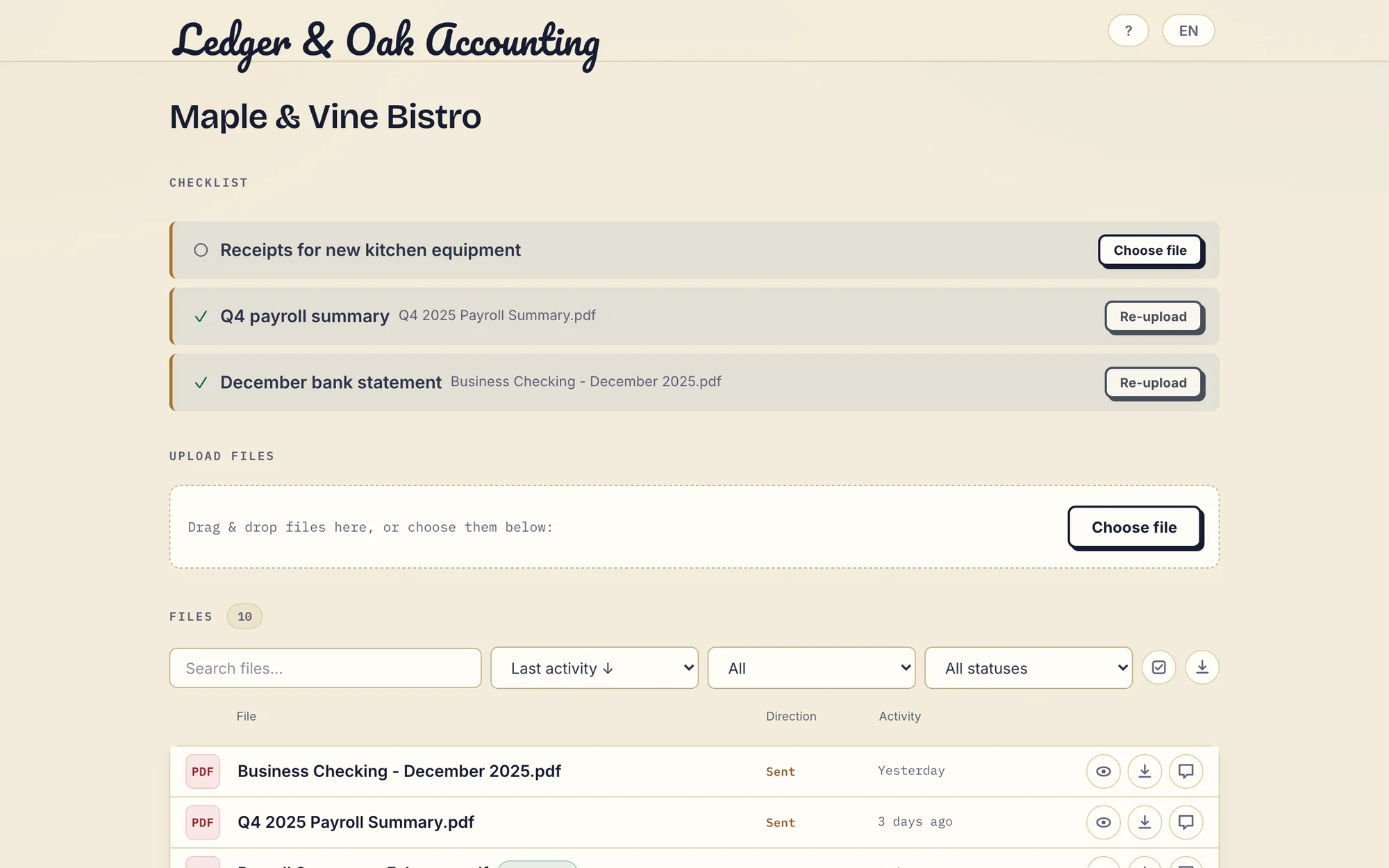
Real product demonstration with fictional Ledger & Oak Accounting and Maple & Vine Bistro data. The desktop portal shows two supplied items and one missing receipt. Open the full-size screenshot.
The app question
This is the sharpest practical difference, and it cuts both ways.
Liscio's apps are a real strength. When clients adopt them, the experience is strong: notifications, a home for the relationship, a client who checks it like any other app. Liscio also works in a browser and documents passwordless magic-link sign-in, so an install is not the only path in.
Droplana takes the fuller version of the browser bet. Nothing to install, no account, no password. The client opens their portal. What they confirm depends on the security level you set: Strict, the default, verifies their email on each new device; Controlled allows one-time or email magic links only; Relaxed also allows permanent links. A client can also sign in with a Google or Microsoft account linked to their email. After verifying, the browser is remembered for 90 days.
The trade is real: no push notifications and no app icon on their home screen. What you get is that there is very little to adopt. Neither approach guarantees that every client uses it, so test the invitation with a few of your own.
Droplana vs Liscio side by side
| Liscio | Droplana | |
|---|---|---|
| Primary object | The conversation | The document |
| Client messaging | Secure messages and email integration | Per-file comment threads only |
| Client access | Web and mobile apps; magic-link sign-in available | Browser portal; no account; Strict verifies email on a new device |
| Requests | Tasks, document requests and due dates | Document checklists with optional due dates |
| Automated chasing | Check your package | Inactivity nudge after 7 days, escalation to you after 14, due-date reminders |
| Two-way document exchange | Yes | Yes |
| Phone camera capture | Through its apps | Take photo button, straight into the checklist item |
| In-browser PDF signing | Check current capability | Yes, with a public verification page per signature |
| Integrations and tax functions | Vary by package | No tax functions or tax software connectors; MCP server and signed webhooks |
| Three-staff annual example | Platform: 1,764 USD/year | Practice: 490 EUR/year plus tax |
| Hosting | Confirm region, DPA and sub-processors | Hetzner in Germany; operated by an EU company in Croatia |
Liscio's plans and features change. Liscio's pricing page lists Platform at 49 USD per user per month billed annually (3 x 49 x 12 = 1,764 USD). Its lower Intelligent Files package and wider Tax Team package have different scope. No exchange-rate saving is claimed.
Market fit, which quietly decides many of these
Liscio is built for accounting firms, with packages priced in US dollars and connections and tax functions that vary by package. If your firm runs on the software those connections serve, that fit is worth a great deal, and Droplana offers nothing equivalent: it has no connector to tax software. Its MCP server and webhooks connect AI assistants and your own systems, not your tax package.
Droplana is aimed at European practices. Files, comments and metadata sit on Hetzner infrastructure in Germany, encrypted at rest with a key per file, the operator is an EU company in Croatia, and a Data Processing Agreement is available on every plan, including Free. For a Dutch or German practice asked by a client's data protection officer where the documents sit and who has legal reach over them, that is the answer they need. For a firm where nobody asks, it is worth little.
Be realistic about which side you are on. It often settles the question faster than any feature does.
What Droplana does not do
- No client messaging inbox. Comments are per file only, with no threading or mentions.
- No mobile app and no push notifications. The portal works in the phone browser.
- No tax software connectors or tax organisers. Decisive if your stack has to connect.
- Logo only, not full branding. Your logo replaces ours in the portal header; no accent colour, no custom domain.
- No real-time chat. An open comment thread refreshes every few seconds.
- Fixed reminders, not workflow. Enabled inactivity reminders nudge the client after 7 days and escalate to you after 14. Optional checklist due dates get a reminder prepared two days before and on the date, which reaches the client with their next email, later that day or the next day.
- Not a qualified e-signature. In-browser signing records who signed, when and from what IP, keeps the original next to the signed copy, and gives every signature a public verification page with a file-hash check. It is not certificate-based or qualified.
- Not an archive. Free keeps each file for up to 180 days after upload. A persistent portal address does not promise permanent file retention.
Who should pick which
Pick Liscio if your client relationships are mostly conversation; you want messaging, tasks and tax functions in one accounting platform; your clients will use its apps; or replacing email as a channel is the actual goal.
Pick Droplana if almost every exchange is about a specific document; you want the comment on the file rather than in an inbox; your clients will not install anything or create accounts; your client count grows faster than your team; or you need an EU company with files hosted in Germany.
If email conversation is your problem rather than document exchange, buy the messaging product. A portal will not fix a conversation.
For the document-first structure in daily use, see the accounting practices page, the legal page or the comparison with email itself.
Questions before you choose
What is the difference between Liscio and Droplana?
Liscio replaces the conversation: secure messaging, email integration, tasks and document requests in web and mobile apps for accounting firms. Droplana replaces the container: one private portal per client holding documents in both directions, with comments attached to individual files. If most client exchanges are general conversation, Liscio fits better. If most are about a specific document, Droplana does.
Do clients need to install an app?
Not for Droplana: clients use the portal in any browser, including on a phone, with no account or password. Strict mode, the default, verifies their email on a new device and remembers the browser for 90 days. Liscio offers web and mobile apps and documents magic-link sign-in, so an install is not its only path either. Test the invitation with your own clients.
Does Droplana have client messaging?
No general inbox. Droplana has comment threads on individual files, visible to your team and that client, with no threading or mentions. An open thread refreshes every few seconds; it is not real-time chat. A question that is not about a file, such as arranging a meeting, has no home in Droplana.
What does a three-person firm pay for Liscio and Droplana?
Liscio's pricing page, checked on 21 September 2026, listed its Platform package at 49 USD per user per month billed annually, which is 1,764 USD a year for three users. Droplana Practice is 490 EUR a year plus tax for up to five team members including the owner, with unlimited clients. The packages cover different scope, so compare what you need, not only the totals.
Plans and limits
Paid plans include unlimited clients: Solo EUR19/month or EUR190/year, Practice EUR49/month or EUR490/year, Studio EUR99/month or EUR990/year, plus tax. Free covers 3 clients, 2 GB and files up to 100 MB. Each paid storage add-on costs EUR15/month or EUR150/year plus tax, adds 500 GB and raises the file limit to 5 GB.
The tools you need, on every plan.
Share files, leave comments, request documents with checklists and sign PDFs in your browser. Your logo is included too.
Clients never pay or create an account. EU hosting, encryption and data export included.
Save 2 months with annual billing
Free Start here
For your first 3 clients
€0/monthNo credit card required
- Just you
- 3 clients
- 2 GB storage
- Up to 100 MB per file
- Files kept for 6 months
Solo
For independent professionals
€19/month+ tax
€190/year+ tax
- Just you
- Unlimited clients
- 50 GB storage
- Up to 1 GB per file
- Email support
Practice
For small firms
€49/month+ tax
€490/year+ tax
- Team size: 5
- Unlimited clients
- 250 GB storage
- Up to 2 GB per file
- Priority support
Studio
For growing teams
€99/month+ tax
€990/year+ tax
- Team size: Unlimited
- Unlimited clients
- 1 TB storage
- Up to 5 GB per file
- Priority support
- Personal setup call
On Free, each file expires 180 days after upload. Your clients and their access stay active, so you can keep sharing new files. Active paid plans have no plan-imposed retention limit. Expiry settings, deletion and cancellation rules still apply; a persistent portal address does not guarantee permanent file availability. Team sizes include you. No setup fees or automatic overage charges. Prices exclude applicable tax.
Compare plan details
| Included | Free | Solo | Practice | Studio |
|---|---|---|---|---|
| Team size | Just you | Just you | 5 | Unlimited |
| Clients | 3 | Unlimited | Unlimited | Unlimited |
| Storage | 2 GB | 50 GB | 250 GB | 1 TB |
| Maximum file size | 100 MB | 1 GB | 2 GB | 5 GB |
| File retention | 180 days from upload | No limit | No limit | No limit |
| Your Droplana address | Includes a random suffix | Your chosen name | Your chosen name | Your chosen name |
| Data Processing Agreement | Standard | Standard | Countersigned available | Countersigned available |
| Support | Priority | Priority | ||
| Personal setup call | Not included | Not included | Not included | Included |
Need more storage?
Add 500 GB for €15/month + tax, or €150/year + tax. Each storage add-on also raises your maximum file size to 5 GB.
Available on all paid plans from your billing page. Add more than one for another 500 GB each. Your team size stays the same.
Related comparisons
Other accounting tools are compared in Droplana vs TaxDome and Droplana vs SmartVault. If client conversation happens in chat apps, see Droplana vs messaging apps.