
Do You Actually Need a Client Portal?
Written by people who sell one. Five conditions that mean yes, four that mean no, and the cheaper fixes worth trying before you buy anything at all.
Do you need a client portal? Only if a document-exchange problem keeps costing you time: documents you have to chase, files you cannot find, or access you cannot explain. We sell one, which makes this an odd article to write, but a large share of people looking at this category do not need one and will be happier knowing that now rather than in three months.
Quick answer (TLDR)
- If you have a handful of clients and documents mostly go outward, you probably do not need one
- The clearest signal that you do: you cannot say which clients still owe you documents without checking
- Retrieval pain, inbound volume and access control are the three things portals fix
- Three free changes fix most of the pain that gets blamed on tooling, so try them first
- Adoption is a real cost, and it lands on your clients, not on you
Four situations where you do not need a client portal
You have a handful of clients. Three or four active relationships, each with a few documents. A folder and an inbox handle this. Adding a portal means asking a small number of people to learn something new to solve a problem that is not costing you anything. Client count is a hint, not a rule: what matters is whether the exchange works.
Documents mostly go outward. If you deliver work and rarely need anything back, your problem is delivery, not exchange. That is a much easier problem, and a link from wherever the file already lives usually solves it.
Engagements are short and do not recur. A portal earns its keep through persistence: the same client, the same place, over years. For one-off projects with people you will not work with again, the setup is overhead with no return.
Nothing has ever gone wrong. No lost documents, no silent attachment failures, no client asking for something you could not produce. Systems get replaced because of failures, not because a better category exists. If nothing is failing, the honest recommendation is to leave it alone.
Five signs you do need a client portal
Any two of these together and a portal is probably worth a trial.
1. You cannot say who still owes you documents. Without checking. Across your active clients, right now. This is the strongest single signal, because email has no state to answer it from, only messages, and answering it by hand is work that repeats every week.
2. Documents come back as often as they go out. Inbound is where email breaks. Twenty clients returning six documents each produces a hundred and twenty attachments in no order, named IMG_4471.jpg, with no way to see what is missing.
3. Relationships last years and repeat. An annual review, a tax season, a renewal. Each cycle, the client asks where to send things and you explain again. A persistent place per client removes that question once instead of every year.
4. Retrieval is costing real time. You regularly search sent items for something you already sent. A client asks for a copy of a document from last March and it takes fifteen minutes. Multiply by your client count.
5. Access control matters. Someone left and their mailbox held client documents. A client asked who in your firm can see their file. A contract requires you to answer that. Email answers it badly.
Three free changes to try first
Try these before buying anything. They fix a surprising share of what gets blamed on tooling, and if they fix it, you have saved money and an adoption fight.
Send the whole list in one message. Most onboarding delay is round trips, not workload. A second request for documents on day nine costs days and some credibility. Decide the entire ask before you write the first message.
Say when phone photographs are fine. Clients often assume a photo will be rejected as unprofessional and delay rather than send one. Few people have a scanner. Tell them which documents a clear phone photo is enough for, and which need the original PDF.
File incoming documents the same day. Every client document that stays in a mailbox is one you cannot find later and cannot hand over when someone leaves. One shared location, filed on arrival.
If you do all three and the pain goes away, you did not have a tooling problem. That is a good outcome.
The cost nobody prices
Portals are usually judged on the monthly fee, which is the smallest part of the cost.
The real cost is adoption, and it lands on your clients. Every one of them has to be told, has to open something new, and has to change a habit. Some will ignore it and keep emailing attachments for months. You will spend some goodwill on this, and that budget is not unlimited.
This is why the account requirement matters more than any feature. A portal that asks clients to create an account and set a password costs more to adopt than one that does not, and the least technical client sets the pace for everyone. Whatever you evaluate, evaluate that part first, ideally by watching one real client use it.
The second cost is running two systems for a while. For a month or two you will have documents in the portal and documents in email, and finding things will briefly be worse than before you started. That is normal, and it is why moving two or three friendly clients first is better than a firm-wide announcement. Set a stop condition before you start: if the client cannot complete the exchange, or the portal duplicates more work than it removes, stop.
The honest self-assessment
Answer these four:
- How many clients have something live right now?
- In the last three months, how many times have you failed to find a document quickly?
- Can you say which clients still owe you documents, without looking?
- If a colleague left tomorrow, how much client material would be stuck in their mailbox?
A few clients, no retrieval failures and a confident yes to question three: you are fine, and nothing in this category will make you better off.
Twenty clients, several retrieval failures, no idea on question three and a nervous answer to question four: the cost is already being paid, only not on an invoice. These are prompts for your own judgement, not a scored test.
Where we fit, and where we do not
Droplana is a client document portal: one private, persistent portal per client, with uploads in both directions, a document checklist the client can see, per-file comments and in-browser PDF signing. Clients never create an account or a password.
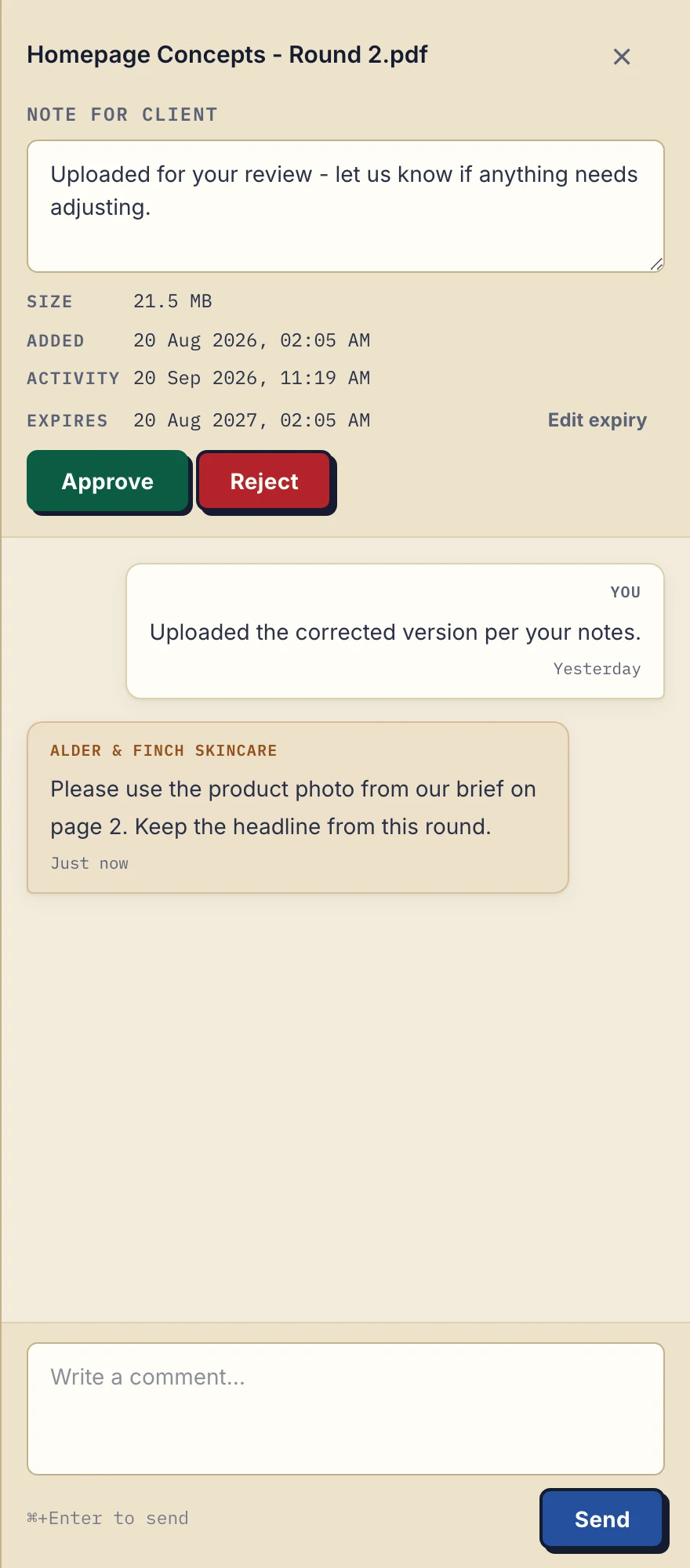
Product demonstration with fictional data: the business-side desktop sidebar for Alder & Finch Skincare. The client asks for a different photo on page 2, and the reply stays with that PDF. Open the full-size capture.
It is not for you if you need bulk storage, a project management tool, internal team collaboration, document editing or long-term archival. It has no native connector that syncs files into your other software. What it does have, on every plan, is an MCP server for an AI assistant or automation tool, and outgoing webhooks for events such as a document uploaded.
Files, comments and metadata stay on servers in Germany. The free plan, with 3 clients and 2 GB total storage, is enough to test the only thing that matters: whether your clients will use it. Its files are kept for up to 180 days, so it suits evaluation rather than anything you must keep. Solo costs €19/month or €190/year plus tax, with unlimited clients, 50 GB and a 1 GB file limit; pricing lists the team plans.
If you read the "no" section above and recognised yourself, that is the correct outcome of this article. Come back when question three starts making you uncomfortable.
More on the threshold, with a one-client pilot, in when to upgrade from email to a client portal, and on the category in what is a client portal. The freelancers page is the closest fit if you are one person deciding this for yourself.
Questions before you start
Do my clients need an account to use Droplana?
No. Clients open their own private portal without creating an account or a password. In the default Strict mode they verify their email on a new device, and that browser is then remembered for 90 days.
Does Droplana Free expire after six months?
No. Free includes 3 clients, 2 GB total storage, a 100 MB per-file limit and 1 business seat. Each file is kept for up to 180 days after upload; the clients, their portal access and the Free account do not expire with those files.
Will a portal connect to the tools I already use?
Partly. Droplana has no native connector to a named product such as accounting or project software. On every plan you can connect an AI assistant or automation tool through its MCP server, and send outgoing webhooks for events such as a document uploaded or a checklist completed.
Want to test it on real clients rather than a demo? Start free with three clients and no card.