
What Happens to Client Files When You Cancel
Before you choose a client portal, ask what happens to your files when you cancel: grace period, export, deletion and what clients see. Our answers included.
What happens to client files when you cancel depends on four things: how long you keep access, how you export, when data is deleted and what your clients see in the meantime. Few people read cancellation terms before they choose a tool, yet they decide what happens to years of client documents on the day you leave. They are much easier to check now than to discover later.
Droplana is a client document portal for sending documents and receiving files back. Leaving any tool like it means accounting for both directions of the exchange, and for the comments that explain them. Below are the questions to ask any vendor, then our own answers.
Quick answer
- Ask five questions before signing up: grace period, read-only access, export, deletion timing, and what clients see.
- An "export" that means downloading files one at a time is not an export.
- A vendor that answers all five clearly has thought about being left, which is a reason to trust it.
- Free plans with retention limits can remove files while you are still using them. That is a separate risk.
- Deleted from live systems and deleted from backups are usually two different dates.
The five questions
1. How long do I keep access after cancelling?
Some services cut access at the end of the billing period. Some give a grace window. Some move you to a free plan with tighter limits, which is a soft version of the same thing.
The number matters less than knowing it. If the window is short and you are cancelling with three hundred clients' documents inside, plan a week of work rather than clicking Cancel on a Friday.
2. Is there a read-only period?
This is different from a grace period and more useful. Read-only means you can still get things out but not put things in, which is what you want during a migration, because it stops the old system from drifting while you move.
3. How do I export everything, in one action?
This is where tools differ most. "You can download your files" is not an export if it means opening each one. Ask whether one export produces everything, and whether it includes the surrounding material: comments, dates, who sent what.
Content usually comes out. Context often does not. If a comment thread on a document matters to you, check whether it survives.
4. When is data deleted?
Two dates, not one: when it disappears from the live service, and when it disappears from backups. In most setups these differ, so a single date deserves a follow-up question. You need the first date for your own retention policy and the second for a client questionnaire.
5. What do my clients see?
The forgotten one. If access ends, does your client get a blank page, an error, or nothing at all? For a portal your clients use, this is a question about your reputation, and it decides whether you tell them before or after.
Vagueness in these answers, or an export that exists but is unusable, is a design decision about how easy you are to leave. It rarely appears in marketing copy, and it is visible as soon as you ask.
The free plan version of this problem
Free plans with retention limits carry a related risk, because it applies while you use the service rather than after you leave. If a free plan removes files after a fixed period, documents disappear on a schedule you did not choose, and the first sign may be a client asking for something that is gone.
Droplana's Free plan works this way, and we come to it below. It is a legitimate design for a free plan and a real hazard if you assumed it was a smaller paid plan. If you must retain records, a retention-limited plan is not the place for them.
What happens to client files when you cancel Droplana
We build a client document portal, so here are the same five questions applied to Droplana.
Grace period. You keep full access until the end of the billing period you paid for, then for 15 more days of grace. If no period end is recorded, the 15 days run from the cancellation. Use the date shown in billing, not the day you clicked Cancel.
Read-only access. There is no dedicated read-only mode. During grace the paid plan stays in effect, so use that time to finish exports and tell clients where to send new documents.
What changes after grace. The Free limits apply: 3 clients, 2 GB of storage and 100 MB per file. Portal access is revoked for clients beyond the three most recent, and each file's expiry is capped at whichever comes first: 90 days after grace closes, 365 days from upload, or an earlier expiry you already set. When storage is over the limit, new uploads are blocked and existing files stay accessible within those caps.
Illustrative timeline: if the billing period ends on 1 March 2027, grace closes on 16 March and the 90-day cap falls on 14 June 2027. A file uploaded on 1 February 2026 reaches its 365-day cap on 1 February 2027, before grace even closes. Do not assume an old file will be available until June.
What clients see, and coming back. Clients beyond the Free limit lose portal access; their files are kept rather than deleted straight away, and access returns if you subscribe again. Files that have already expired or been deleted do not come back.
Export. There are separate exports, and you need all of the ones that apply:
| What you need | Export or download | Check before you leave |
|---|---|---|
| Account data | JSON export | Open it and check the records and context you need |
| Owner's activity trail | CSV from Account → Activity | Check the events and date range relevant to your work |
| File contents | ZIP, up to 2 GB or 2,000 files | Open the archive and sample the documents |
| Larger file sets | Folder download in a Chromium browser | Confirm the download finished and the files open |
The account JSON does not contain the files themselves. Context matters too: a request to replace a wrong-month document is one example of something a PDF alone does not explain.
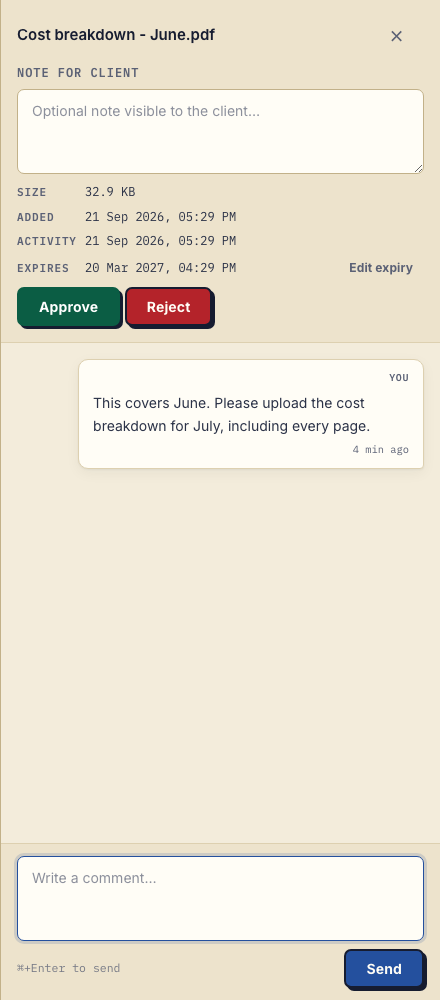
Actual desktop capture with fictional Clearpath Studio and Alex Morgan data. It shows a correction comment worth keeping with your exported records.
Deletion. Cancelling does not delete your account; deleting it is a separate action. Account deletion removes all active data immediately. Backups exist for disaster recovery only, are not user-accessible, and their retention is system-defined and not published. That is the honest answer to give a client who asks you to confirm deletion: removed from live systems immediately, with backup retention set by the provider. Backups are not a way to restore a file you deleted.
The Free plan. On Free, each file is kept for up to 180 days after upload. Clients and their portal access stay active; only the files expire. That makes Free right for trying the product on real clients, and wrong for anything you are obliged to keep.
No automatic deletion otherwise. On an active paid plan nothing is removed unless you set it: you can put an expiry date on an individual file at upload. That is deliberate, because silently removing client documents would be worse. It also means your retention policy is yours to apply.
Before you cancel anything
- Choose a destination. Decide where each client's files and required records will live, and who will have access.
- Export while the account is fully active. Not during grace, when you are working against a clock. Open the exports and check client coverage, file counts and readability.
- Tell your clients before access changes. A client who finds a dead portal link is a worse conversation than one who was told last week. Download any files that arrive after your first export.
- Cancel, and note the deadline shown in billing. Check files that already have an earlier expiry.
- Decide about account deletion separately, after checking your retention requirements.
For the retention decision itself, see how long to keep client files. For the Free limits in detail, see what a free client portal includes. The freelancers page fits if you are evaluating this for a one-person business.
Questions before you start
Does the 15-day grace window start when I click Cancel?
No. You keep full access until the end of the billing period you paid for, and the 15-day grace window starts then. Check the date shown in billing rather than counting from the day you cancelled.
Is there one export containing all my data and files?
No. Account data exports as JSON and the owner's activity trail as CSV. File downloads are separate: a ZIP of up to 2 GB or 2,000 files, or a folder download in a Chromium browser for more. Open both before you leave.
Can I get a refund when I cancel?
Cancelling a subscription and requesting a refund are separate actions. The Refund Policy sets out when a refund request is possible and how to make it.
To see how the exchange and its exports work before you commit, start free with up to 3 clients.