
Collecting Files Is Harder Than Sending Them
Every file-sharing tool is built around sending. Collecting has four problems sending does not, which is why the return direction is where client work stalls.
Product demonstration: Product screenshots use fictional demonstration data; sample requests are illustrative, not measured customer results.

Almost every file-sharing tool is designed around one direction: you have a file, someone else needs it, here is a link. That problem was solved a long time ago, and solved well.
Collecting files from clients is the other direction, and it is where client work gets stuck. It is a harder problem, not the same problem reversed.
Quick answer
- Sending is one action you control; collecting depends on someone else.
- Collecting has four problems sending does not: dependency, no defined end, unpredictable form and tracking.
- The scanner requirement is an easy obstacle to miss, because clients rarely mention it.
- Visible state matters most, because collecting is not finished when you act.
Why collecting files is harder than sending them
1. It depends on someone else
When you send, you decide, you act, it is done. When you collect, completion depends on another person's schedule, equipment, understanding of what you asked for, and willingness to deal with it now rather than later. A statement may even be held by a bank or a previous adviser.
You have no control over any of that. You only have influence, and how much you have depends on how you phrased the request.
2. There is no defined end
Sending has a clean finish: the file is delivered.
Collecting finishes when the last item arrives, and until then it sits in a partial state. Four of six documents received is not four-sixths done. For most purposes it is not done at all, because you cannot start the work. This is why collection tasks stay open for weeks in a way that sending tasks do not.
3. What arrives is unpredictable
You send a named PDF. You receive IMG_4471.jpg, sideways, three of six pages, plus a photo of a computer screen showing a PDF, plus a forwarded email with an attachment inside another forwarded email.
None of this is the client being difficult. It is what capture looks like from a phone in the real world. But every incoming document needs a look before you can rely on it, and some need to be requested again.
4. You have to track it
Sending needs no tracking: it happened or it did not. Collecting across twenty clients means holding twenty partial states, each with its own list of what is still missing.
That tracking has to live somewhere. In many firms it lives in someone's head, a spreadsheet updated now and then, or an email thread read backwards. All three drift, and the drift shows up as asking a client for something they sent last week.
Why the scanner problem matters
One obstacle is easy to miss, because it is invisible from where you sit.
Many people no longer own a scanner. For them, "please scan and return" means finding a print shop or borrowing an office. That is not a five-minute task, so it gets put off, with no end date.
The client will not tell you this. Saying "I don't have a scanner" feels like an admission, so they say nothing and the request waits. From your side it looks like unresponsiveness.
The fix costs one sentence: say a phone photograph is fine, and say what makes one usable, such as a flat surface, good light and all four corners in the frame. Also say where a photo is not enough and you need the original PDF, for example a bank statement you can download.
What a collection process needs
Visible state, on both sides. You need to see which items are missing without opening anything. The client needs to see what is still outstanding without asking you. The second half changes the timeline, because the client can act on it whenever they happen to think of it.
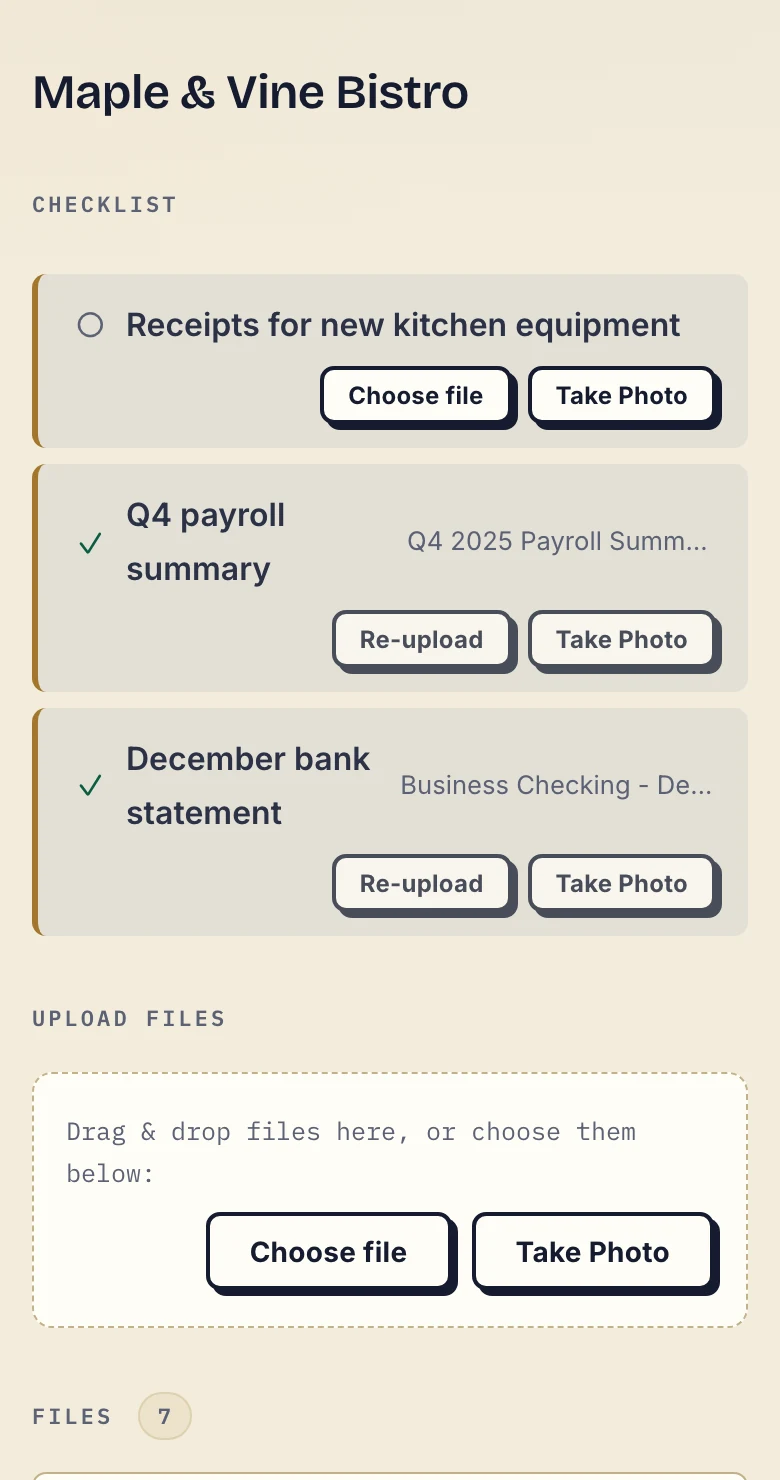
Product demonstration with fictional data. The fictional Maple & Vine Bistro client sees that the payroll summary and bank statement are supplied and the kitchen-equipment receipts are still missing.
A request with a clear finish. "Send the accounts" names no period, format or pages. An illustrative list to adapt:
- Payroll summary for [period]: the agreed export, including [required fields].
- Statement for [account and period]: every page, preferably the original PDF.
- Equipment receipts for [purchases]: readable totals and dates; clear photos accepted for this request.
This is not an official accounting requirement. Adapt it to the work you have agreed.
A destination that outlives the request. Reading and doing happen at different moments and often on different devices. A request that exists only inside one email has to be found again, and often it is not. One persistent place per client survives the gap.
Tolerance for messy input. Accept photographs. Accept six images instead of one PDF. Combine them yourself if you need a single file; you have the tools and the client does not. Every rule you add about format is a place where the process can stall.
Feedback on the specific item. "The second bank statement is missing the last page" needs to sit on that statement, not in a general email about "the documents" that the client has to decode. The follow-up then names only what is missing:
Thank you, we have the payroll summary and statement. Please add the receipts for [purchases] to [portal link] by [date]. Clear photos are fine for these. If a receipt is unavailable, tell [contact] which one so we can agree the next step.
No credential. Every account and password is a step where a client can stall, and a support request three months later. For someone who deals with your process twice a year, a password is pure cost.
Why most tools do sending well and collecting badly
Sending is the easier product to build and the easier one to sell.
A transfer service is built for one moment: a big file needs to move. Links expire, because the transfer is the whole lifecycle. That model suits delivery and fits collection badly, where a request may stay open for three weeks and the relationship lasts years.
A cloud drive is built for storage and offers sharing as a permission model. Receiving means granting write access to a folder. It works, but it leaves the organisation to you, with no record anywhere of what is still missing.
Both can receive files. Neither is designed around the four problems above, and the difference shows where it costs most: the tracking.
Where Droplana fits
We built Droplana for the collection direction, so read this section with that in mind.
Droplana is a client document portal. Each client has one private, persistent portal for sending documents and receiving files back, with no account and no password. In the default Strict mode the client confirms their email on a new device, or signs in with Google or a connected Microsoft account, and the browser is remembered for 90 days. You set a document checklist per client, and the client sees which items have arrived and which have not. They can photograph paper with the Take Photo button on their phone. Each file has its own comments and a status, so "this one needs redoing" sits on the document.
If the client goes quiet, checklist reminders are on by default: after 7 days without activity while items are missing, the client gets an email naming them, and after 14 days the reminder goes to you instead. An item with a due date also gets a reminder prepared two days before and on the date, which reaches the client with their next email and is not sent once the item is supplied. If your own systems need to know when a pack is complete, signed webhooks report each completed item and completed checklist.
What it does not do: it will not merge six photos into one PDF, it does no edge detection or image cleanup, and it will not make an unavailable document exist. It does not verify that a document is genuine; you still check what arrives.
More on the mechanics in how to collect documents from clients, and on why requests fail in why clients don't send documents. The accounting practices page shows the collection direction when it is most of the job.
Questions before you start
Why is collecting files from clients harder than sending files to them?
Sending is one action you control and complete in a moment. Collecting depends on someone else's time, equipment and understanding, has no defined finish, arrives in unpredictable formats and at unpredictable times, and requires you to track what is still outstanding. Those are four separate problems that sending does not have.
Why do clients stall on 'please scan and return'?
Many clients do not own a scanner, so the request waits until they find one. Saying explicitly that a clear phone photograph is acceptable removes an obstacle that is invisible from your side, because clients rarely say that this is why they have not replied.
Does receiving a file finish the request?
Not necessarily. A supplied file may have missing pages or cover the wrong period. Check it before treating the item as complete, and ask for the correction on that file.
Want the collection direction to be the part that works? Try Droplana free with three clients and one short request.