
Why Clients Don't Send Documents (And What to Do)
Why clients do not send documents: unclear requests, missing records or access friction. Match each cause to a practical fix that gets the files back to you.
Illustrative example: Sample requests are illustrative. Product screenshots use fictional demonstration data, not customer results.

Clients may not send documents because the request is unclear, the record is unavailable or they cannot act when they read the message. Some are also unwilling to share. Find out which obstacle applies before repeating the same reminder.
Droplana is a client document portal with upload checklists and file-specific comments, which make the request and the return path clearer for both sides.
Why clients do not send documents: six checks
| Possible obstacle | A practical remedy | What still needs your attention |
|---|---|---|
| The request is vague | Name the document, period and acceptable format | Decide what this engagement requires |
| They read it away from their files | Give one portal address they can return to | Agree a realistic time to act |
| They think a scanner is required | Say which items can be phone photos | Check readability and required format |
| They do not know what arrived | Keep supplied and outstanding checklist items visible | Review supplied documents |
| Another person holds a record | Identify it and ask them to request it first | Agree what to do if it is unavailable |
| They are uncomfortable sharing | Explain purpose, access and retention | Listen and agree the next step |
These are possible causes, not a diagnosis of every silent client. Ask a short question when the reason is unclear: “Is the document unavailable, is the request unclear, or would another return method help?”
Make the request specific
Illustrative request wording:
Please send [document] covering [period] for [purpose] through [portal address] by [agreed date]. For this item, [accepted format] is suitable. Our business owner and authorised team members can access it, along with contacts attached to your client portal; other clients cannot. We intend to keep it for [agreed period]. Tell [contact] if it is unavailable or if you have a concern about sending it.
Replace every bracket with the actual requirements. Do not promise that only one person can see a file if authorised colleagues or other client contacts can also access it.
For a paper document that you accept as a photo, ask for good light, every edge in frame and readable text. Where a different format is required, name that item separately instead of saying all documents need scanning.
Show what arrived on a phone
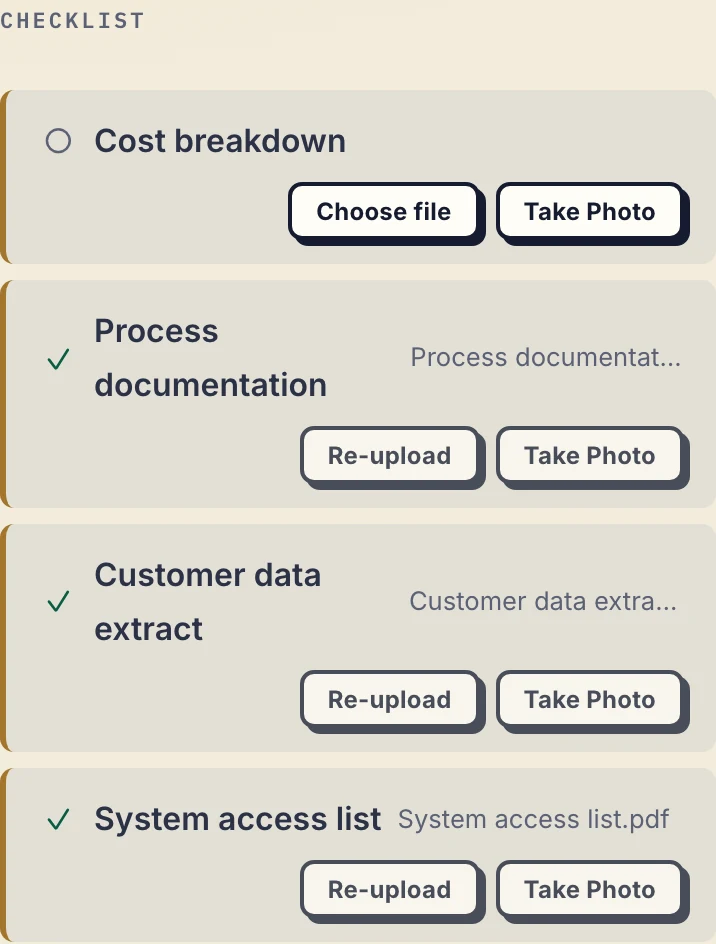
Product demonstration: the actual phone portal with fictional Granger Foods data. The checklist separates supplied files from the missing Cost breakdown. Supplied does not mean reviewed or accepted.
The client sees the missing Cost breakdown apart from the supplied inputs, so nobody has to ask which upload arrived.
When uploads are enabled, the client can return files through their browser, including phone photos of paper. No client signup is needed. Strict mode requires email verification on a new device. A returning client uses the same portal address while access remains active.
Review before sending another reminder
Illustrative example: you request a statement for [period], and the client uploads the wrong period. A generic reminder to “send your documents” does not explain the problem. Comment on that file: “This covers [received period]. Please upload the statement for [required period], including every page.” Review the replacement and tell the client what remains.
Optional checklist due dates and fixed reminders can support an agreed schedule. A due-date reminder is prepared two days before the date and on the date, is not sent once the item is supplied, and reaches the client with their next email; the business and the client can switch it off. Separate inactivity reminders nudge the client after 7 days and escalate to the business after 14. If you connect an AI assistant through the Droplana MCP server, you can also ask it which clients still owe items and, with the permission to email clients, have it send them a reminder. None of these resolves an unavailable document or a concern about sharing it.
If the client still cannot proceed, agree an alternative, a revised scope or the next conversation through your normal process.
Cost, retention and next steps
A persistent address is not permanent file storage. Free includes 3 clients, 2 GB shared storage, a 100 MB file limit and files kept for up to 180 days from upload. Solo costs €19/month or €190/year plus tax, with unlimited clients, 50 GB storage and a 1 GB file limit. Both have one business seat; teams need Practice or Studio. Active paid plans have no plan-imposed retention limit, subject to expiry settings, deletion and cancellation. See plans and limits.
See how to collect documents from clients for the return methods and why collecting files is harder than sending them for the receiving side. The accounting practices page shows the per-client structure in recurring work.
Questions before you start
Why might a client not send a requested document?
The request may be unclear, the document unavailable, the return method inconvenient or the client uncomfortable sharing it. Ask which obstacle applies rather than assuming every delay has the same cause.
Does a checklist prove the documents are correct?
No. It helps show supplied and outstanding items. Your team still reviews each file and asks for specific corrections where needed.
Can a portal make every client respond?
No. A portal can clarify the request and return path. It cannot supply missing information, obtain third-party documents or resolve unwillingness to share.
Try Droplana free with one client exchange before choosing a plan.