
File Sharing for Small Business Clients: A Practical Guide
Choose file sharing for small business clients with one simple exchange, a short comparison of methods and a pilot with your first client before you commit.
File sharing for small business clients works best when both sides know where to send a file and what to do next. Try one complete exchange with one client before changing how everyone works.
Droplana is a client document portal: a private space per client where you send documents and the client uploads files back. You can keep using email for conversation and your existing tools for accounts and editing.
A first-client pilot: estimate out, site photo back
Illustrative example: a small design business sends a client Garden-room-estimate-r01.pdf. Before confirming the scope, it needs a photo of the existing room and a dimension sketch.
Create that client's portal, add their email address and enable uploads. Upload the estimate and create two checklist items: “Photo of the existing room” and “Dimension sketch”. Ask the client to open the estimate and return the two inputs.
Clients do not create an account. With Strict mode, the default, they verify their email on a new device. The persistent portal address is a destination, not permission to bypass verification.
The business then checks whether the photo is clear and the sketch has the measurements it needs. If something is missing, leave a comment on that file naming the correction. If the estimate changes, upload r02 as a separate file and say which revision to review.
The pilot is complete when the client has found your estimate, returned the requested files and understood your reply. A portal created with no files in it does not tell you whether the exchange works.
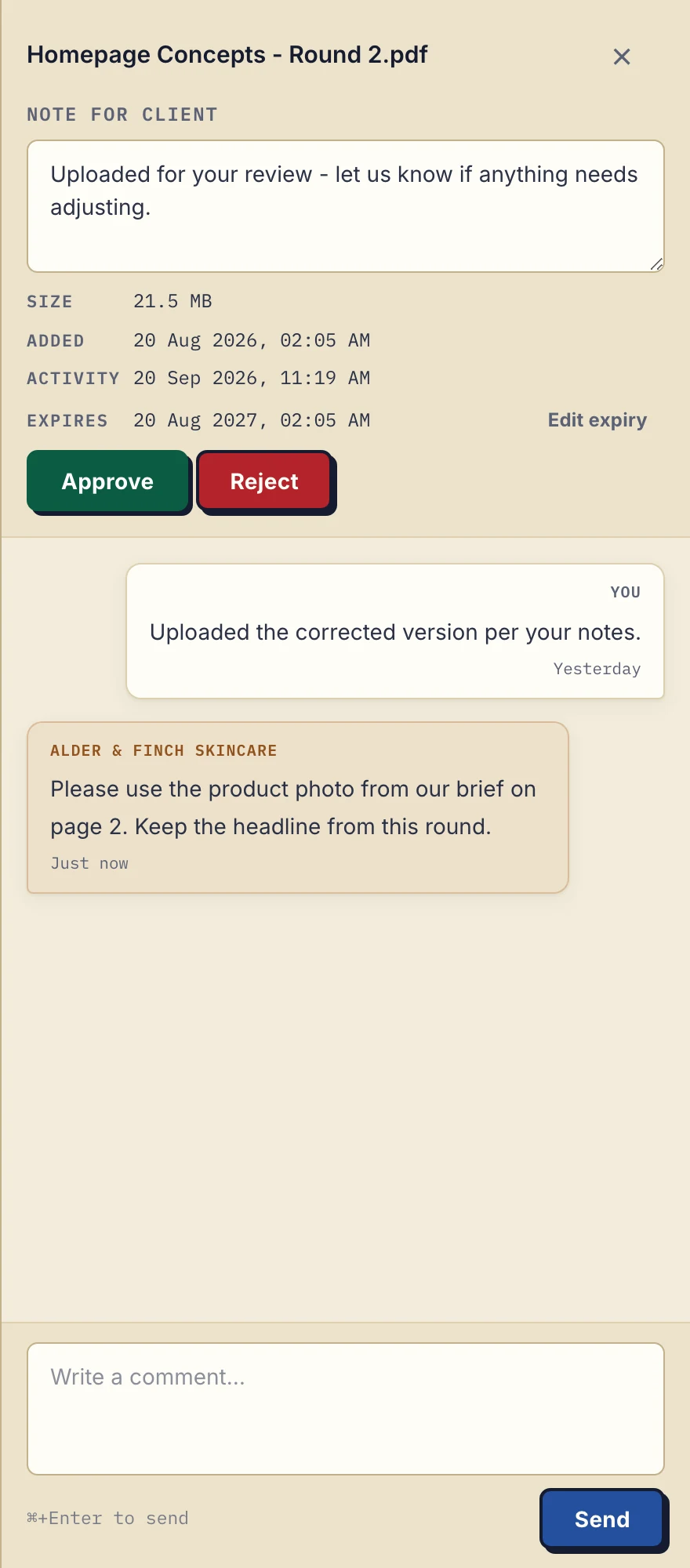
Product demonstration with fictional data: the desktop sidebar for Alder & Finch Skincare keeps a comment beside the named PDF. This is a file discussion, not a project chat or document editor. Open the full-size capture.
The fictional agency PDF in this capture shows the same comment control you would use to ask about an estimate. It is a demonstration of the interface, not a result from the garden-room example.
File sharing for small business clients: choose a method
| Method | When to use it and what to check |
|---|---|
| A few occasional files and a clear filing habit. Check: recipients, attachment size and where you save the final copy. | |
| Messaging | Quick questions around a job. Check: where important documents will be filed after the conversation. |
| Shared drive | Your folder structure already works for both sides. Check: permissions, current revision and who tracks missing documents. |
| Client portal | The same clients repeatedly send files back. Check: client access, upload limits, retention and team visibility. |
There is no client-count threshold at which email becomes wrong. Change the method when you can name a recurring problem, such as unclear revisions or requests spread across several conversations. If files are already easy to find and requests get completed, your existing setup may be enough.
Send one clear invitation
Sample message:
Your estimate is in your client portal at [portal address]. Open it and verify your email if asked; no account or app is needed. Please upload a room photo and the dimension sketch to the two named checklist items. Email me if you have trouble opening it.
Add a date in your own message if the job needs one. Do not ask the client to move an entire archive or learn every feature on the first visit.
If they email the photo instead, upload the needed copy manually and check it opens. Reply with the agreed location for the next file. That keeps the pilot useful without making a client's preferred channel a dispute.
Where Droplana fits and what it costs
Free covers this pilot at no cost, and no card is required to start. Solo costs €19/month or €190/year plus tax, with unlimited clients, 50 GB total storage, 1 GB per file and 1 business seat. Active paid plans have no plan-imposed retention limit, but expiry settings, deletion and cancellation rules still apply.
If two colleagues need their own business access, Solo is not enough: Practice has 5 seats including the owner for €49/month or €490/year plus tax. Check the remaining pricing and storage limits before moving the rest of your clients.
A persistent portal address does not mean files stay forever. Tell clients when to download their copies and keep required records outside the portal. Droplana does not replace editing software, invoicing or a permanent archive.
Decide after the exchange
Ask the client which step was unclear. Check whether you can find the estimate and the returned inputs without searching other apps. Fix names or instructions before inviting another client; do not assume the pilot saved time simply because it used a new tool.
For a broader filing approach, use the client organisation guide. The freelancer page shows the same approach for a one-person service business.
Questions before you start
Can I try the full exchange for free?
Free costs €0 and supports 3 clients, 2 GB total storage, 100 MB per file and 1 business seat. Free keeps each file for up to 180 days after upload; clients and portal access remain.
Does my client need an account or app?
No. The client uses a browser. With Strict mode, the default, they verify their email on a new device before accessing their portal.
Should I move every client at once?
Start with one client and one real exchange. Check that they can download your file and return what you requested, then improve the instructions before inviting more clients.
Start a Free portal and send one document with one clear request for a file back.