
Client Communication for Small Businesses: Beyond Email
Choose channels for small-business client communication: email for updates, a portal for files and a clear invitation explaining uploads, access and review.
Illustrative example: Sample requests are illustrative. Product screenshots use fictional demonstration data, not customer results.

Client communication for small businesses works best when each channel has a clear job. Keep conversations and scheduling where clients expect them; put documents, return uploads and file-specific feedback in a place both sides can find again.
Droplana is a client document portal: each client has a private, persistent space for sending files and returning documents. It can support the file-related part of communication alongside your existing email, calendar and project tools.
Client communication for small businesses: choose the channel
| Need | Channel to use | What to make explicit |
|---|---|---|
| A quick question or meeting time | Email or your agreed messaging channel | Who will answer and when |
| Deliver a proposal or revised document | Client portal | Filename, revision and requested action |
| Collect documents | Portal checklist with uploads enabled | Document, period and acceptable format |
| Correct a page in a file | Comment on that file | Page number, issue and replacement needed |
| Coordinate project tasks | Your project management tool | Owner, dependencies and deadline |
| An urgent issue | The urgent contact method you agreed | Availability and escalation route |
See the email comparison for the file-exchange tradeoff. There is no universal client count at which email stops working. Repeated resends, searching across apps and unclear revisions are more useful signals.
Keep feedback with the file
Illustrative example: a consultancy sends Proposal - Rev 2.pdf and asks the client to check the scope on page 3. The client comments on that file and uploads the missing brief. The consultant reviews the brief before treating the request as complete.
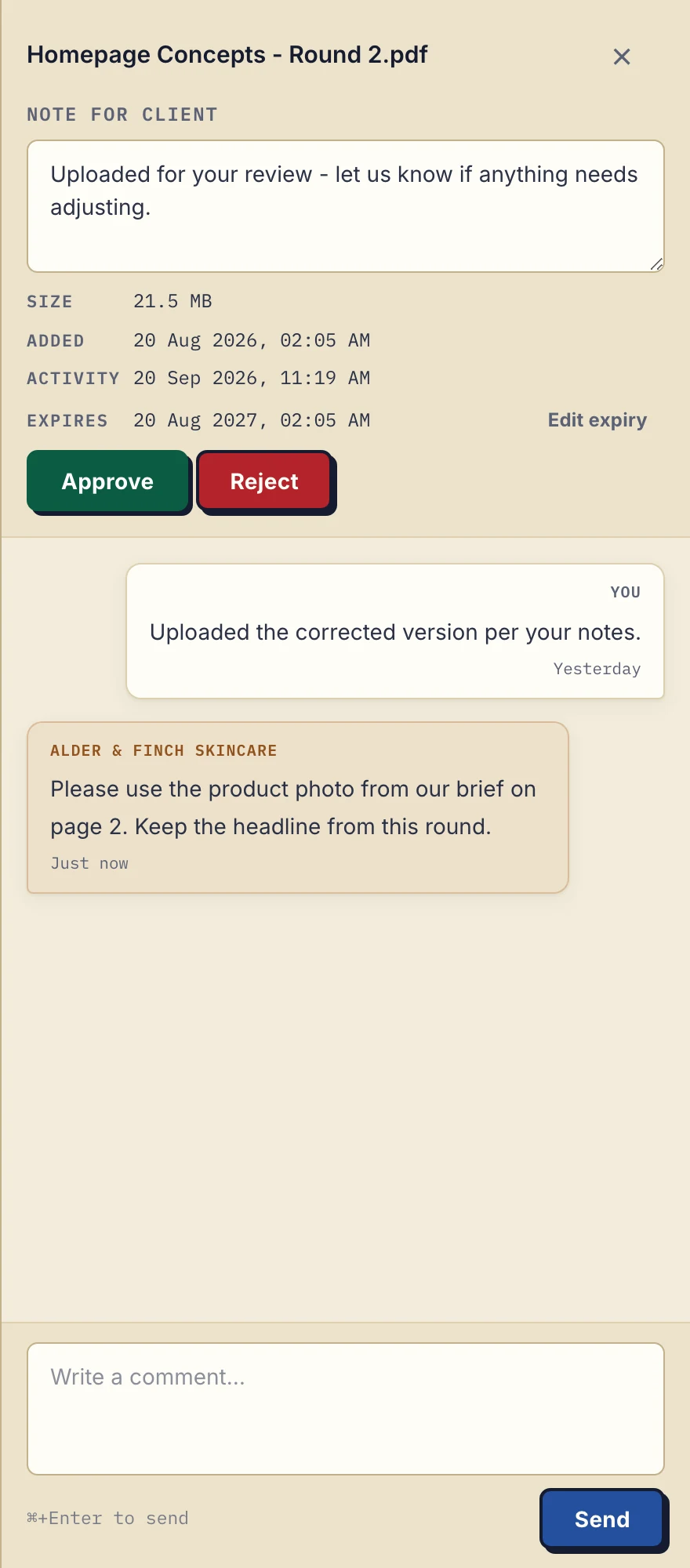
Product demonstration: the actual desktop file sidebar, cropped for readability, with fictional Alder & Finch Skincare data. The client asks for a specific correction on a PDF. A comment is not proof that the correction has been completed.
Droplana's file markers are Approved, Rejected or unset. Either side can change or clear them. Use document approval guidance to distinguish a file marker from a required signature or contractual decision. New uploads are separate files, so name revisions clearly; there is no automatic latest-version selection.
An invitation you can adapt
Hello [name], your documents are at [portal address]. Please upload [document and period] against the checklist by [agreed date]. No signup is needed; follow the email verification prompt when shown. For a correction to a file, leave a comment on that file. Keep scheduling questions in email and call [number] for urgent matters during [hours]. We will review your upload by [date]. Tell us if an item is unavailable.
Clients do not create an account or choose a password. Strict mode, the default, requires email verification on a new device. Enable client uploads when you want files back. The business owner, authorised team members and contacts attached to that client can access the client's portal; other clients cannot.
Try the process with one client and ask whether they could find the file and return the requested document. A portal cannot guarantee a response, resolve an unclear brief or replace urgent communication.
Cost and fit
The same boundary applies to freelancers, agencies and coaches: use the portal for repeat document exchange and keep other work in its existing tools. If you want those tools to hear about new uploads and comments, every plan includes signed webhooks and an MCP server for an AI assistant or automation tool. A persistent address does not promise permanent file storage.
Free includes 3 clients, 2 GB shared storage, a 100 MB file limit and files kept for up to 180 days from upload. Solo costs €19/month or €190/year plus tax, with unlimited clients, 50 GB storage and a 1 GB file limit. Both have one business seat; teams need Practice or Studio. Active paid plans have no plan-imposed retention limit, subject to expiry settings, deletion and cancellation. See plans and limits.
Questions before you start
Should all client communication move into a portal?
No. Use the portal for files, upload checklists and file-specific comments. Keep scheduling, general conversations and urgent issues in the channels you have agreed with the client.
Do clients need a Droplana account?
No. Clients do not create an account or choose a password. Strict mode requires email verification on a new device, and client uploads must be enabled by the business.
How many clients can I try for free?
Free includes 3 clients, 2 GB shared storage and a 100 MB file limit. Each file is kept for up to 180 days from upload.
Try Droplana free with one client exchange before choosing a plan.