
Client Sign-Off: A Clear Request Without the Chase
Ask for client sign-off on a named document with a specific review request and follow-up. See how comments and approval markers differ from a signed PDF record.
Product demonstration: Screenshots show the actual product with fictional data. Sample messages and scenarios are illustrative, not customer results.

Client sign-off starts with a request that names the document, the decision and the agreed response date. Put that request beside the file, ask the client to explain what they reviewed and follow up if the date passes. Droplana, a client document portal, keeps the file, your request and the client's reply together in one private, persistent portal per client; the follow-up stays yours to send. Clients do not create accounts. Strict mode, the default, verifies email on a new device; a verified browser is remembered for 90 days.
Ask for client sign-off on a named revision
A document approval workflow sets the overall process. The immediate problem is often one unanswered report: “please review” leaves the client to work out which file, which sections and what happens next.
Illustrative request from a consultant:
I've uploaded Q3 Strategy Report - r02.pdf. Please check the proposed priorities and figures on pages 3–5, then leave your response on that file by Friday. If anything needs changing, name the page and the change. If you need more time, tell me so we can agree the next step.
This request can be sent with the portal address. Keep detailed questions with the file, where both sides can refer to the same export. The email comparison explains how this differs from another attachment in the inbox.
Read the response before changing the plan
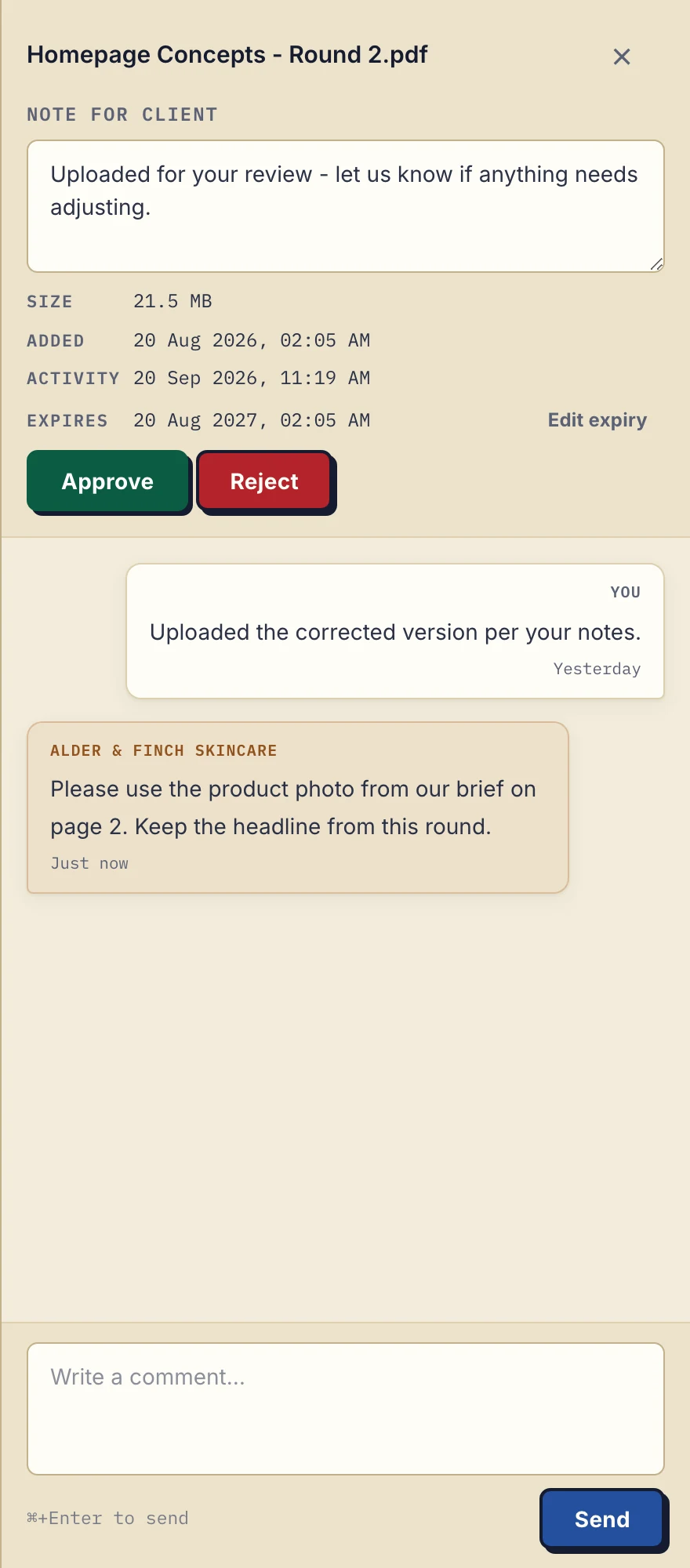
Product demonstration with fictional data. Alder & Finch Skincare asks for a change on Homepage Concepts - Round 2.pdf. The comment refers to a page; it is not an annotation on the image. View the full-size comment panel.
The pictured client asks for a photo change while keeping the headline. That is actionable feedback, not an approval of the whole document. The business must make the correction and request review of the new upload.
A file can be Approved, Rejected or unset. Either the business or the client can set or clear the marker. Rejected does not lock or remove the file; explain the reason in a comment. A marker is not a signature, proof of reading or locked sign-off.
There is no separate Awaiting approval marker. An unset file may be unread, under discussion or awaiting a response; check the comments rather than guessing. A download does not prove the client read or accepted the content.
If a response comes through a messaging app, clarify the filename and scope of the response. A vague “looks good” needs context regardless of the tool used.
Follow up on the unresolved question
Illustrative message after the agreed review date:
We are still waiting for your response on Q3 Strategy Report - r02.pdf. Is there a section you want to discuss, or do you need a later review date? We will agree the next stage once that is clear.
Droplana's checklist reminders concern missing uploads, not approval of work you delivered. If your own tools should notice the reply, signed webhooks report each new comment and each signed document. If you need supporting documents before review, the document checklist handles that separate request.
For a consultant, a call may be the right next step if the decision is unclear. Avoid treating silence as acceptance or promising that a portal will eliminate chasing. For several assets, the agency approval guide explains how to keep each request separate.
If the document needs a signature
In-browser PDF signing is a separate action. An identified signer types, draws or uploads a mark, places it on the PDF and saves a new signed file. Clicking Approve does not perform those steps.
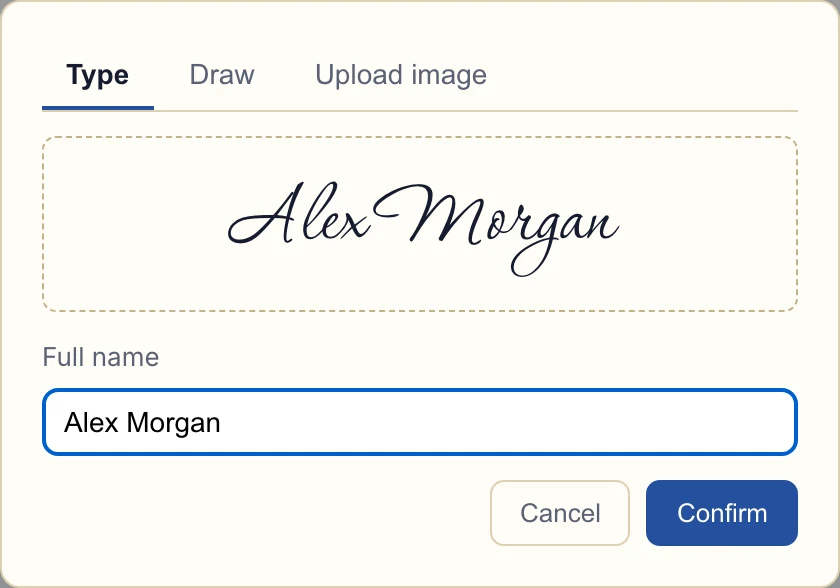
Product demonstration with fictional data. This is the signature capture dialog. Typing a name is not independent identity verification. View the full-size signature dialog.
The signing record is associated with the signer's login; it does not independently verify their identity or decide legal suitability. The signed-contract return guide shows the return process and what the saved record means.
Try a request you already know how to review
Free covers 3 clients, 100 MB files and 2 GB storage, enough for this test. Solo costs €19/month or €190/year plus tax, with unlimited clients, 50 GB total storage, files up to 1 GB and one seat. Active paid plans have no plan-imposed retention limit, subject to expiry settings, deletion and cancellation.
Use a fictional report, send the short request and check both the comment and status on the exact file. Agree internally who owns the follow-up before using this process with a client.
Questions before you start
Does Droplana remind clients to approve a document?
No. There are no automatic approval reminders. The review request lives in a file comment and the business sends its own follow-up. Checklist reminders concern missing uploads, not approval of a delivered document.
Can I see when the client downloaded the report?
Yes. The business owner's activity log records downloads, comments and approvals and can be exported as CSV. A download shows that the file was fetched, not that the client read or accepted it.
Can a client sign with only a private link?
No. Signing requires an email-identified client session through an email magic link, Google or Microsoft, including a remembered verified device. An unverified permanent or one-time link alone does not allow signing.