
Migrating Client Files Without a Big-Bang Cutover
Migrate client files in small batches with a manual download, upload and verification checklist, so active clients keep working while you move them.
Migrating client files without a big-bang cutover means moving active exchanges in small batches, checking the copies and leaving the archive under a named owner. Start with up to three clients before announcing a change to everyone.
Droplana is a client document portal for sending files and receiving documents back. Migration into it is manual: nothing imports your old folders or keeps them in sync. Keep using your existing editing and records systems.
1. Choose the scope and cut date
Pick the date after which new work for the pilot clients goes into the portal. List older documents needed for that current work; the cut date is not a reason to omit a document the client still needs.
Illustrative manifest: Northbank Studio's September review needs Review-r02.pdf and Process-notes.pdf, plus one outstanding request for a cost breakdown. The 2024 archive remains in the firm's records store with Mira as its owner. This is a manual record of where things live, not a migration feature.
Use the manual migration and export templates to record scope, check downloads and plan the switch.
2. Download and check the pilot files
Download the selected files from the old system. Keep the originals available while checking filenames, file counts and whether representative documents open. Separate files for different clients before uploading anything.
Record the largest file and total selected size against your destination plan. Free costs €0 and supports 3 clients, 2 GB total storage, 100 MB per file and 1 business seat. Files expire up to 180 days after upload; clients and their portal access remain. The pilot must fit all those limits, not only the client count. Export an editable source document to a suitable delivery format when needed, retaining the original in its working system.
Do not delete the old copy because a download button finished. Check the saved file and record anything missing before moving on.
3. Upload and verify in the new portal
Create the client portal, add the intended contact address and upload the selected files manually. Download or open a representative uploaded file and compare it with the copy you selected. Check that it is in the correct client's portal.
Recreate outstanding checklist items and essential instructions. Do not assume an upload brings the old permissions, comments, statuses or revision relationships with it. Droplana stores a new upload as a separate file.
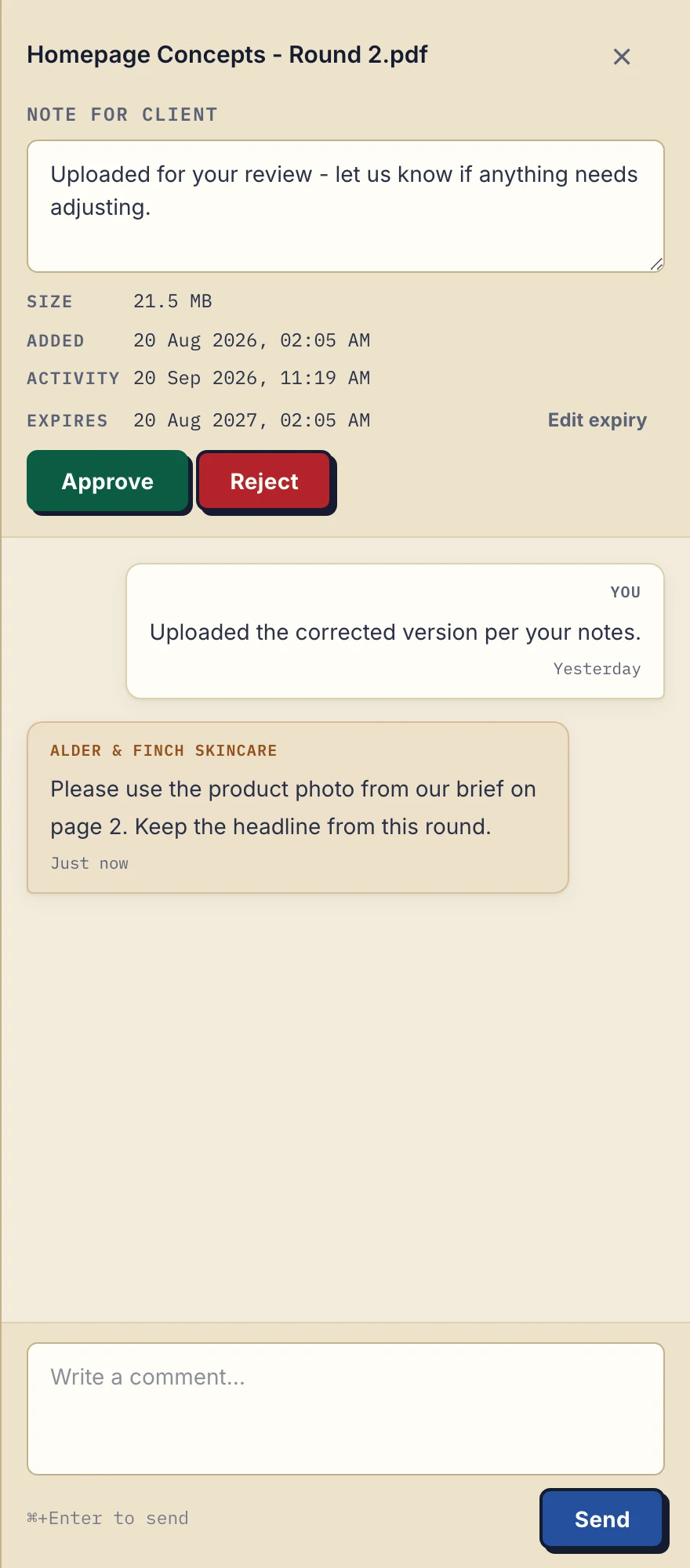
Product demonstration with fictional data: the desktop sidebar for Alder & Finch Skincare keeps a comment beside the named PDF. This is a file discussion, not a project chat or document editor. Open the full-size capture.
The fictional agency PDF illustrates where you can write context after upload. It is not proof that comments were imported from another system.
4. Run a complete exchange with the pilot clients
Clients do not create an account. With Strict mode, the default, they verify their email on a new device. The persistent portal address is a destination, not permission to bypass verification. Send the portal location with a purpose: a document ready to review and one request for a file back.
Sample invitation:
From [date], please use your client portal at [portal address] for the September review. Verify your email if asked. Review r02 is ready to download; please upload the cost breakdown to the named request. Earlier completed records remain in [agreed location]. Email me if any step is unclear.
Ask each client to open the delivered file and return the requested document. Record whether they found the right revision, understood the request and completed the upload. Fix confusing names or instructions before scaling. A month is one possible pilot period, not a promised adoption time.
The portal adoption guide gives more detail on the client side.
5. Move the remaining clients in batches
Choose groups small enough to support, for example five clients at a time. Include a frequent document exchanger early so the pilot does not only cover your easiest case. Each batch repeats the download, upload and verification checks.
For migrated clients, direct new files to the agreed location. Where the old system supports it, make the old exchange read-only. Otherwise tell people explicitly where new work belongs and monitor exceptions.
If a client sends an attachment by email, upload the needed copy manually and reply with its new location. If the pilot fails, pause the next batch, record where each new file lives and restore the agreed process for those clients. Retained source copies make that decision easier; there is no automatic rollback or two-way sync.
6. Verify exports before retiring the old system
Set an archive owner, review date and decision about old access. Check required records before cancelling a service or deleting files. The guide to moving beyond email can help decide whether changing the exchange channel is warranted at all.
For a later export from Droplana, separate the data types:
| Export | What to check |
|---|---|
| Files | ZIP download supports up to 2 GB or 2,000 files; larger exports require folder download in a Chromium browser |
| Account data | JSON export; it is not a replacement for downloading the document files |
| Activity trail | CSV export by the owner; keep it with the records that need it |
Check the saved files, counts and sample contents. Do not assume a file export reconstructs a portal with its permissions and workflow in another product.
Migrating client files into Droplana: fit and cost
Solo costs €19/month or €190/year plus tax, with unlimited clients, 50 GB total storage, 1 GB per file and 1 business seat. Active paid plans have no plan-imposed retention limit, but expiry settings, deletion and cancellation rules still apply. Practice and Studio support business teams; see pricing before a multi-person pilot. Free is useful for a small exchange, but its file retention is not an archive policy.
If you already use an AI assistant or an automation tool, it can connect to your account through Droplana's MCP server on every plan and upload a document to a client's portal. That helps with a single file, not a bulk import, and outgoing webhooks only report new events such as an upload or a completed checklist.
The consultant workflow illustrates the ongoing exchange after migration. Keep historical records where they can be managed properly, and move older files only when they serve current work.
Start a Free pilot with the files for one active exchange before moving the next client.