
Password-Protected PDFs Are Not a Security Strategy
A password-protected PDF guards against a wrong recipient, not against lost copies or old access. See what it protects, what it misses and what to use instead.
The routine is familiar in a lot of firms. Export the document, set a password, attach it to an email, then text or phone the password separately. It feels careful, and in some situations it is. A password-protected PDF protects the contents of one file against the wrong recipient. It does not manage who keeps a copy, when access ends or how you find the record again, and that is the part most firms need.
Quick answer
- Modern PDF encryption is strong. A weak or reused password makes that strength irrelevant.
- A password sent through the same channel as the file gives both halves to the same reader.
- It helps against misdelivery and a later mailbox breach. It gives you no revocation, no access record and no retention control.
- For recurring exchange, send a link to a place where the document lives, with access tied to the person.
Password-protected PDF security: the encryption and the password
It helps to separate the cryptography from the practice, because they are not equally weak.
PDF encryption in recent versions of the standard uses AES, and AES is not the weak point. Check what your tool sets, though: a password to open the file is not the same as a restriction on editing or printing, and only the first keeps the contents private. Adobe's password-protection guidance describes the two controls.
The weak point is almost always the password. A file on someone's disk can be attacked offline, with no rate limiting and no lockout, at whatever speed their hardware allows. Short passwords, dictionary words, the client's surname plus a year, or the firm's standard password used for every client all fall quickly under that kind of attack. The last one is common, because a password nobody can remember does not survive a busy week.
The same applies to encrypted zip files, with an extra trap: the legacy ZipCrypto scheme still found in some tools is weak whatever the password. If you use zip encryption, it needs to be AES.
The channel problem
This is the failure that appears most often in practice.
If you email the encrypted attachment and then email the password, you have sent both halves through the same channel. Anyone able to read one message can read the other.
Sending the password by text or phone is better, because an attacker now needs two different channels. But it adds friction, and that is where the practice slowly erodes:
- The password gets reused across clients so the office can keep track of it.
- It gets written into an email template "for convenience".
- It gets sent in the same thread three months later when the client asks again.
- It ends up in a spreadsheet of client passwords, which is now the most sensitive file you own.
None of these are failures of understanding. They are what happens when a manual security control meets volume.
What it does protect against
To be fair, the practice is not pointless.
Misdelivery. You type the wrong address, or autocomplete picks someone with a similar name. With an encrypted attachment and a password delivered separately, the wrong recipient gets a file they cannot open. That is a real save.
A compromised mailbox later. The email sits in a mailbox for years. If that account is breached in 2029, an encrypted attachment is better than a plain one.
If your only alternative is attaching the document in the clear, encrypting it is an improvement and you should keep doing it.
What it does not address
Revocation. Once the file is sent, it exists on the recipient's device, in their mail provider's storage, in their backups and anywhere they forwarded it. If the engagement ends, there is nothing to withdraw.
A record of what happened. When a client says they never received the tax return, nothing in the attachment model shows otherwise.
Retrieval. Four months later the client asks for it again, and you search your sent items from memory.
Retention. Your policy says a category of document goes after a set period. Copies of it now sit in two mailboxes, two backup systems and possibly a downloads folder.
Size. Many mail providers limit attachments to roughly 20 to 25 MB, and encryption does not make the file smaller.
The client's side. They save the file to their desktop and forget the password. Six weeks later they ask you to resend it, and the password travels again.
The pattern that replaces it
Send a link to a place where the document lives, with access tied to the person rather than to a shared secret. Compared side by side:
| Question | Password-protected attachment | Client portal such as Droplana |
|---|---|---|
| How does the recipient open it? | With the file and the password | With the access your security mode allows |
| Can access stop later? | No central control once the file is sent | Portal access can be revoked, effective immediately |
| Can downloaded copies be recalled? | No | No |
| What is recorded? | Whatever your mail system keeps | Activity the owner can export, including uploads and downloads |
| Where does the client find it again? | In their inbox, if they kept it | In the same portal |
| Who manages retention? | Your process and every recipient's copy | Your process, file expiry in the portal, and any copies already downloaded |
Two lines in that table matter most. A download event shows that a file was downloaded, not that anyone read or accepted it. And neither method can recall a copy someone already saved.
"Access tied to the person" is the important detail. A link that opens for anyone who has the address is convenient, but it is close to an unencrypted attachment that you also cannot revoke. Access should depend on a verification the recipient completes, or an account they already hold.
An illustrative recurring exchange: a legal practice sends a draft to a client, receives a corrected document and gets a question about one paragraph. In a portal, the files and the question stay in the client's space instead of in three separate email threads. The practice still decides who may open them and how long to keep the final record.
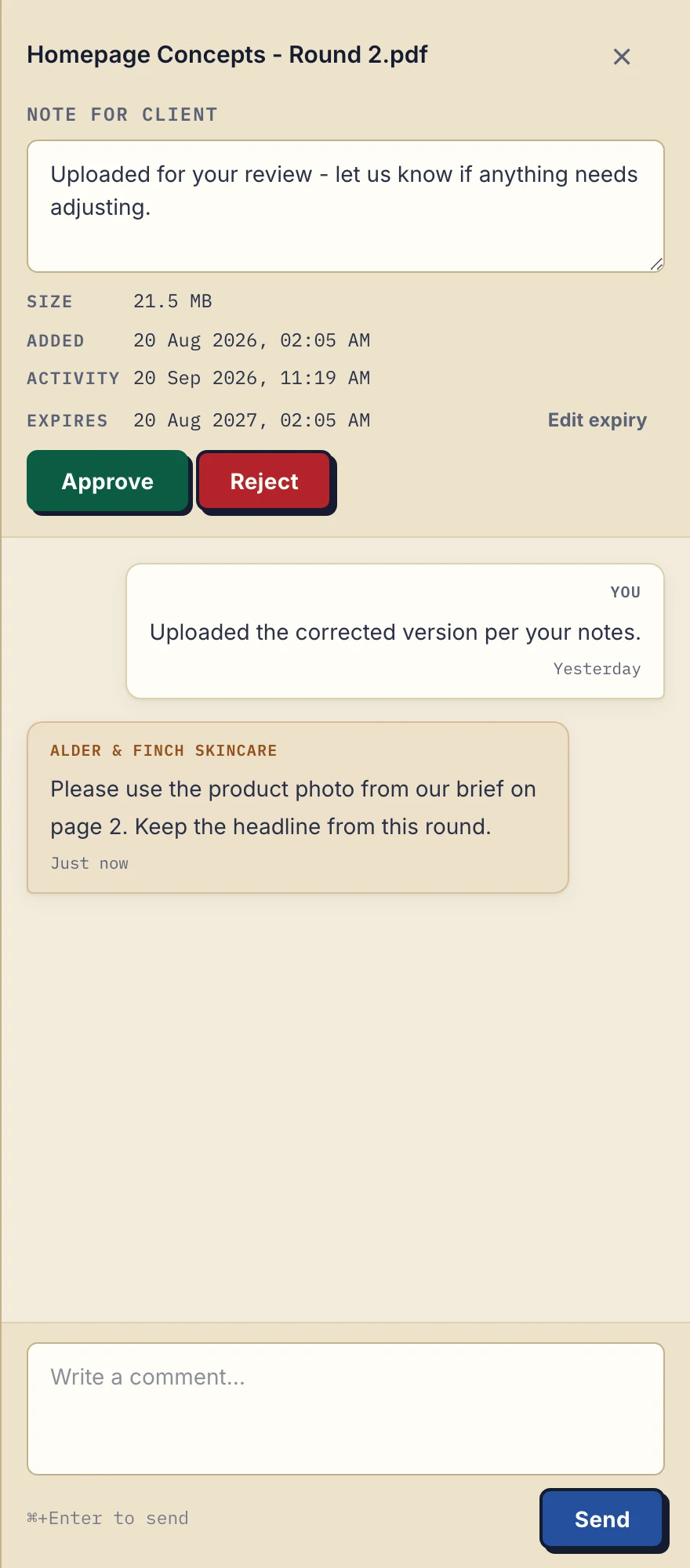
Product demonstration with fictional Alder & Finch Skincare data. This desktop panel shows file expiry and comments. View the full-size capture.
How Droplana handles this
We build a client document portal, so this section is about our own tool.
Each client has a private portal for documents you send and files they return. You send a link, not a file. The client confirms access with an emailed magic link, or signs in with Google or with a Microsoft account connected once to their address, and the browser is then remembered for 90 days. There is no client account, no password to create and no second channel to manage.
New accounts default to Strict, which requires email verification on every new device. Controlled also allows one-time links. Relaxed also allows permanent links, which are the closest thing to "anyone with the link": whoever holds a valid one-time or permanent link can open the portal without verifying an email, so Relaxed is an opt-in for less sensitive work. Revoking a client's access takes effect immediately.
Files are stored on Hetzner infrastructure in Germany under opaque, randomly generated identifiers, encrypted at rest with AES-256 using a key derived per file, and never exposed on the public internet. Droplana is operated by Ubique d.o.o., an EU company in Croatia. If you connect an AI assistant or automation tool through Droplana's MCP server, it works on metadata such as filenames and comments; no tool returns a document's contents.
The limits are on our security page in the same words. Encryption at rest protects against a breach of the storage platform, not against a compromise of the application host, where the master key sits alongside the storage credentials. It is not end-to-end encryption: we could technically read file contents. If you need a provider that cannot, look at a zero-knowledge service instead.
Free covers 3 clients, 2 GB of storage and 100 MB per file, and keeps each file for up to 180 days from upload. Paid plans start with Solo at €19/month plus tax for unlimited clients and 1 GB per file. See plans and limits.
When encrypting an attachment is still right
A portal is not always the answer.
- A one-off exchange with someone you will not work with again, where setting up access is out of proportion.
- A recipient whose organisation blocks external links but allows attachments.
- A regulator, court or counterparty that specifies a delivery format.
- A recipient who cannot complete any verification step.
In those cases, use AES encryption, generate a long unique password for that document, send it through a different channel and do not reuse it. The technique is sound; it does not scale to recurring work.
The guide to secure client portal software covers what to check in a portal, and GDPR-compliant file sharing with clients covers the data-protection side. For confidentiality duties in practice, see the legal page.
Questions before you start
Is a password-protected PDF secure enough to email?
It depends on the password and on how it travels. Modern PDF encryption is strong, but a short or guessable password can be attacked offline once someone has the file, and a password sent in the same email thread gives both halves to anyone who can read that thread.
Is an encrypted zip file better than a password-protected PDF?
Only if the zip tool uses AES encryption rather than the legacy ZipCrypto scheme, which is weak in its own right. Even with AES, the password still has to reach the recipient safely, and the file leaves your control once it is sent.
Does Droplana provide end-to-end encryption?
No. Files are encrypted at rest with AES-256, which protects against a breach of the storage platform. The application host holds the master key, so the protection does not cover a compromise of that host, and Droplana could technically read file contents.
For documents you send every month, try Droplana free with one client and see whether a link you can revoke fits your work better than a password.