
File Sharing Without WhatsApp: What Professionals Use
Move client documents from WhatsApp to a portal while keeping chat for quick questions. Use a sample invitation, a concrete exchange and clear access rules.
File sharing without WhatsApp can mean moving the documents while keeping the conversation. Choose one place for files that both sides need to find again, then use chat to point to that place.
Droplana is a client document portal for sending documents and receiving files back in a private space per client. It can hold the estimate, the returned photo and a comment about that file while scheduling stays in chat.
File sharing without WhatsApp: move one document exchange
Illustrative example: a contractor and client use chat to arrange a visit. Their conversation also contains a site photo, an old estimate and a revised estimate. The problem is identifying which files the current job uses, not whether messaging can send a document.
Choose the revised estimate, save the copy needed for the job and upload it as Garden-room-estimate-r02.pdf in the client's portal. Check the file opens. Add a comment: “Please review r02; it replaces the earlier estimate.” Create a checklist item for the one missing input: “Photo of the wall beside the doorway”.
Ask the client to download the estimate and upload the photo to that item. Check that the photo shows the requested area before moving ahead. If it does not, explain the correction beside the file.
This is a manual move. Droplana does not import a WhatsApp history, synchronise a chat or decide which old attachment is current. Keep any conversation records you need under your own recordkeeping policy.
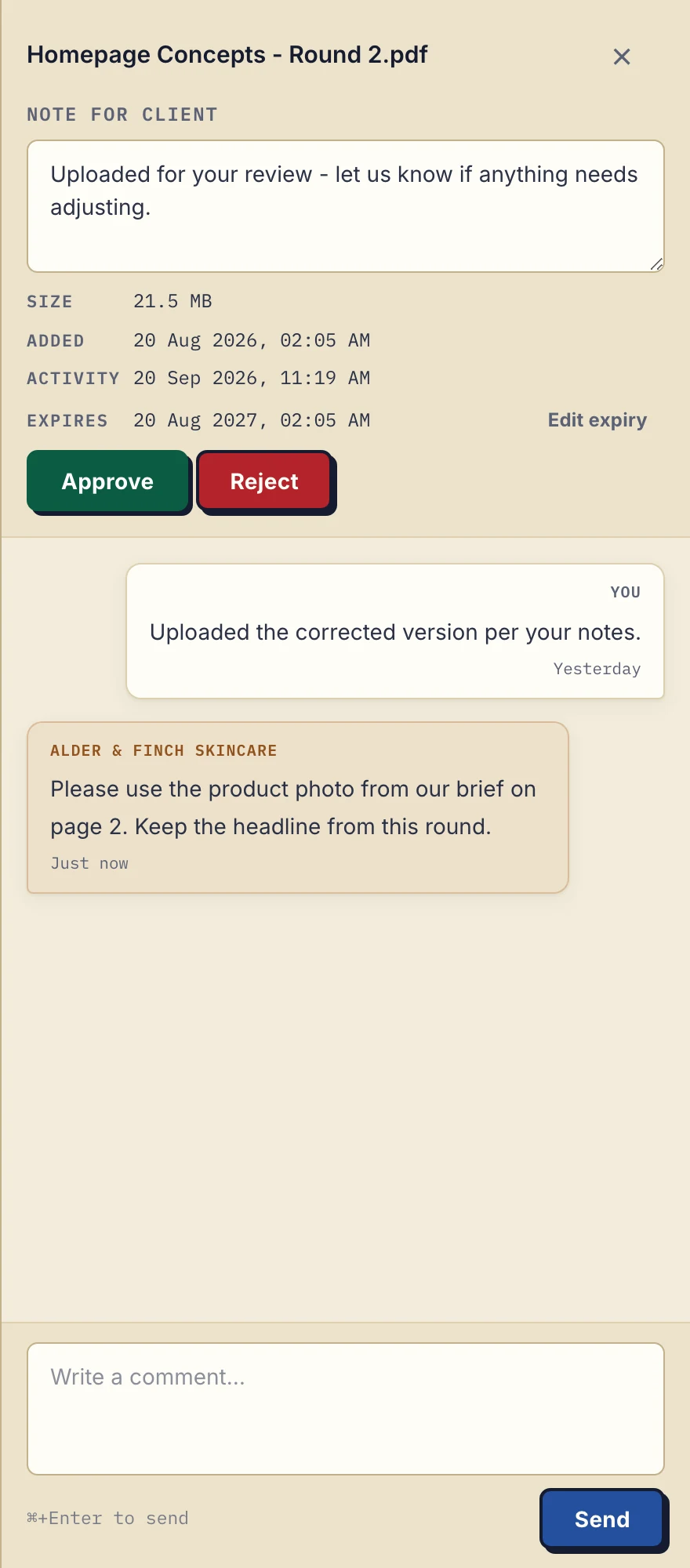
Product demonstration with fictional data: the desktop sidebar for Alder & Finch Skincare keeps a comment beside the named PDF. This is a file discussion, not a project chat or document editor. Open the full-size capture.
A client invitation you can adapt
I'll keep using this chat for visit times and quick questions. Your revised estimate is now in your client portal at [portal address]. Open it and verify your email if asked; no account or app is needed. Please upload the doorway photo to the named request there, so we can find it beside the job documents.
Clients do not create an account. With Strict mode, the default, they verify their email on a new device. The persistent portal address is a destination, not permission to bypass verification. Send access information to the intended client contact, and check that they can open the file before sending further requests.
If they prefer to return this first photo in chat, move the needed copy manually and confirm where it is saved. For the next request, send the portal location with a specific action. Adoption is something to check, not something to promise after a fixed number of days.
Keep the channel rule small
| Use chat for | Use the portal for |
|---|---|
| Arrival times and access to the site | Current estimate or plan |
| A quick question about the appointment | Requested photos or supporting PDFs |
| A note that a file is ready | A comment explaining a correction to that file |
A client portal is useful when this exchange repeats. For occasional documents, a maintained email filing process may be enough. For a one-off delivery, assess the transfer-service option and its current limits instead of introducing an ongoing portal.
The messaging comparison covers the channel decision in more detail. This guide does not depend on claims that chat cannot search, lacks security or inevitably loses files. The practical question is whether your client can identify the document and the action expected.
Where Droplana fits and what it costs
Free costs €0 and supports 3 clients, 2 GB total storage, 100 MB per file and 1 business seat. Free keeps each file for up to 180 days after upload; clients and their portal access remain. Solo costs €19/month or €190/year plus tax, with unlimited clients, 50 GB total storage, 1 GB per file and 1 business seat. Active paid plans have no plan-imposed retention limit, but expiry settings, deletion and cancellation rules still apply. See pricing for team plans and larger-file options.
Droplana provides file comments and Approved/Rejected statuses, not a general chat channel or live document editing. Uploading a revision creates a separate file. A persistent portal address does not extend file retention, and a download cannot be recalled by ending access later.
The freelancer workflow shows how one business owner can use the portal alongside existing work tools. Keep your archive and any required correspondence records elsewhere.
Questions before you start
Do I need to stop using WhatsApp with clients?
No. Keep chat for agreed quick conversation and scheduling. Move documents when a separate exchange location helps both sides find the file and understand the next action.
Can Droplana import my WhatsApp files automatically?
No. Save the needed files, upload them manually to the correct client portal and check the uploaded copies. Droplana does not synchronise a chat history.
Does the client need to sign up?
No client account or app is required. Strict mode, the default, requires email verification on a new device before the client accesses the portal.
Try one exchange on Free: send the current document, request one file back and keep scheduling in chat.