
What Real Estate Agents Use to Share Documents With Buyers
Share property documents in one private buyer portal, request a clear return checklist and separate client access from listings and multi-party transactions.
Illustrative example: Sample requests are illustrative. Product screenshots use fictional demonstration data, not customer results.

Real estate agents can share documents with buyers through email, a file-sharing service or a transaction system, depending on the work. A client portal fits an ongoing exchange where the agent sends property files and the buyer returns specific documents. This guide describes that option, not an industry-wide usage survey.
Droplana is a client document portal with one private space per client, so the agent-buyer exchange stays in one place: property packs go out, requested documents come back and questions stay on the file they are about.
Share documents with buyers: choose the right unit
A buyer may consider more than one property. Name the property in each file and request so they can distinguish them. A client portal does not create separate permissions for each property within that client's space.
The buyer's adviser, seller, broker and agent do not automatically become separate transaction roles. Contacts attached to one client share that client's portal. Use a dedicated transaction system when your work needs role-specific access, deal stages or coordinated approvals across parties.
For simpler exchanges, compare the portal with sending attachments by email.
An illustrative buyer document checklist
Fictional example: North Quay Property shares a viewing pack with buyer Alex Morgan for Harbour Flat. The responsible professional chooses the required documents for the engagement and location; the following is an editable request example.
| Direction | File or request | Make clear |
|---|---|---|
| Agent to buyer | Property pack, Rev 1 | Which property and revision |
| Agent to buyer | Available report or disclosure selected for review | Purpose and any question to answer |
| Buyer to agent | [Named financing document], if needed | Relevant period and acceptable format |
| Buyer to agent | [Named identity document], if required | Purpose, recipient and approved collection method |
| Buyer to agent | [Specified funds evidence], if required | What is necessary for this request |
Name the pack Harbour Flat - Property pack - Rev 1.pdf so the buyer can identify both the property and revision. Avoid asking for sensitive documents merely because a template contains them. Name who needs each return and why. The document-collection guide covers the mechanics; an uploaded ID is not completed identity verification.
Review a file and request a correction
Illustrative exchange: Alex uploads the requested document, but one page is unreadable. The agent leaves a file comment naming that page and asks for a replacement. The agent then reviews the replacement before accepting it.
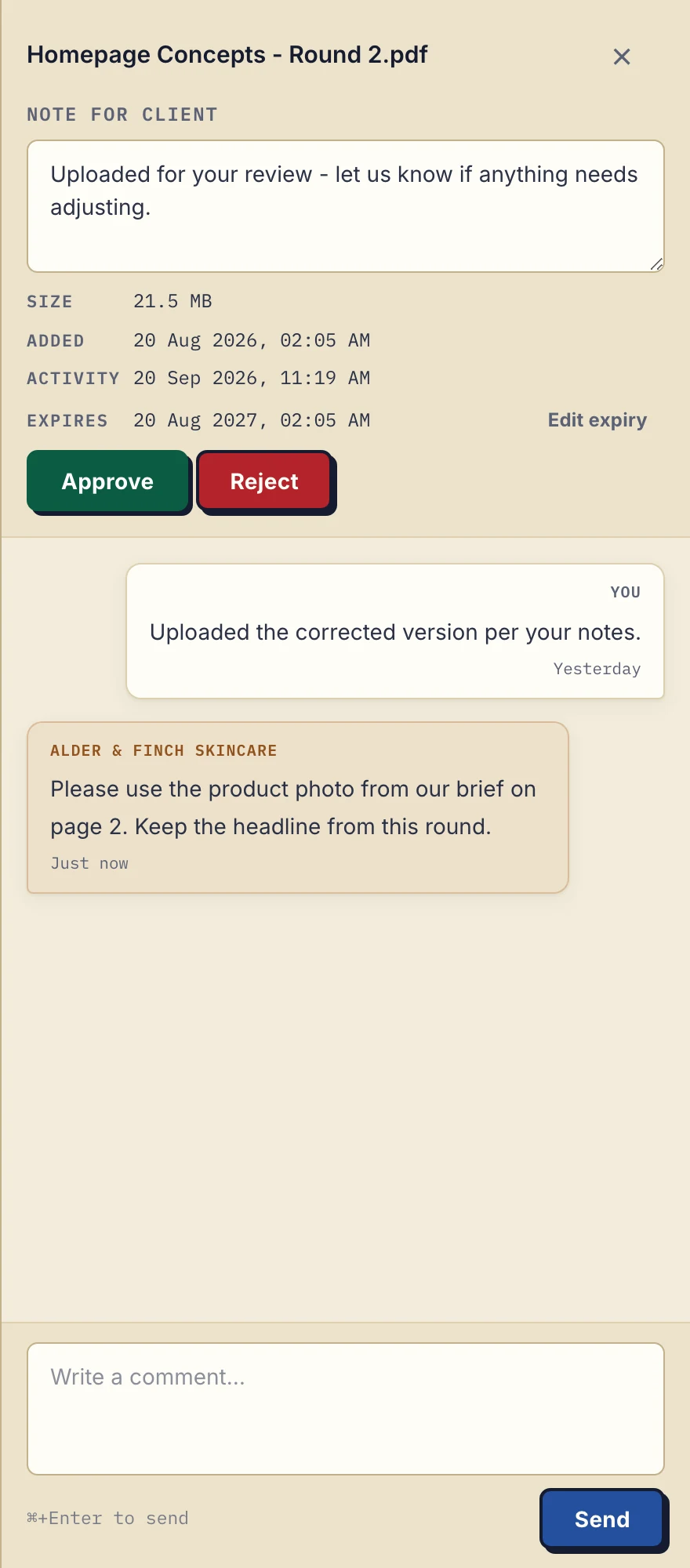
Product demonstration: the actual desktop file sidebar, cropped for readability, with fictional Alder & Finch Skincare data. The client asks for a specific correction on a PDF. A comment is not proof that the correction has been completed.
This actual desktop capture uses fictional design data to show the correction mechanism, not a property transaction. Droplana's file markers are Approved, Rejected or unset, and either side can change or clear them. They are not custom transaction stages or proof that someone read a document. See document approval boundaries.
A file marker does not replace your established process for a contract or a binding instruction.
An invitation and an access boundary
Hello [name], the [property reference] documents are at [portal address]. Please review [filename] and return [specific document] by [agreed date]. No signup is needed; verify your email when prompted. Tell me if an item is unavailable or unclear. Do not forward your portal access; contact me if another adviser needs documents.
Clients do not create an account or choose a password. Strict mode, the default, requires email verification on a new device. Enable client uploads when you want files back. The business owner, authorised team members and contacts attached to that client can access the client's portal; other clients cannot.
Agree retention before closing
A persistent portal address does not guarantee permanent storage. Tell the buyer how long files will be available and keep any required archive separately. Copies already downloaded remain outside portal access controls.
Free includes 3 clients, 2 GB shared storage, a 100 MB file limit and files kept for up to 180 days from upload. Solo costs €19/month or €190/year plus tax, with unlimited clients, 50 GB storage and a 1 GB file limit. Both have one business seat; teams need Practice or Studio. See plans and limits.
See Droplana for real estate agents for the full client-exchange workflow.
Questions before you start
Can a buyer sign a document in the portal?
Yes, with in-browser PDF signing, once the buyer has signed in with an email link, Google or Microsoft. They type, draw or upload a signature and place it on the page; the signed PDF is saved as a new file and Droplana records who signed, when and from what IP address. It is not a qualified electronic signature, so follow your established process where one is required.
Does receiving an identity document verify the buyer?
No. Receiving a file is document collection. The responsible professional still performs the checks required for the engagement using their established process.
Are property files stored permanently?
No permanent-storage promise applies. Free files last up to 180 days from upload. Active paid plans have no plan-imposed retention limit, subject to expiry settings, deletion and cancellation.
Try Droplana free with one client exchange before choosing a plan.