
Event Photo Delivery: When WeTransfer Links Expire
Plan event photo delivery around an agreed download period, clear packages and client replies. Compare a persistent portal with transfers and gallery proofing.
Illustrative example: Examples use fictional deliveries. Product captures show the real application with fictional data.

For event photo delivery, agree how long the files will be available and tell the client when to save their own copies. If a WeTransfer link has expired, check whether recovery is available or arrange a fresh delivery from your retained originals; an expired link does not by itself prove the originals are lost.
Droplana offers a different arrangement: one private, persistent client portal for final downloads, event documents and files the client sends back. Its address can stay the same across deliveries, while each file still follows retention and expiry rules.
Event photo delivery needs a stated download window
Do not promise that every transfer expires after seven days. As checked on 21 September 2026, WeTransfer's help page lists up to three days for Free and Starter transfers and sender-controlled availability on Ultimate. Plans and settings matter; check the transfer's actual expiry. See the WeTransfer comparison for the broader fit question.
Droplana also needs a clear availability agreement. Free keeps each file for up to 180 days from upload. Only those files expire; the client, portal access and Free account stay active. Active paid plans have no plan-imposed retention limit, subject to expiry settings, deletion and cancellation. A persistent portal address is not a promise of permanent file storage. Agree an availability period and keep a separate archive.
A wedding couple wanting the photos again later should know where their own saved copy belongs. A corporate client should know who will download the approved delivery into its internal library. Neither should have to infer a storage promise from the word “link”.
Separate gallery selection from final delivery
Use a dedicated gallery or proofing service when clients need a visual gallery, favorites, ratings or print selection. Droplana does not provide those workflows. It can hold the selected final downloads alongside a release form, invoice, event recap or corrected caption document.
For a fictional company event, a useful package might contain:
Company-Event-Selected-Photos-v01.zip: agreed final image selection.Company-Event-Captions-v01.pdf: filenames matched to supplied captions.Company-Event-Delivery-Notes.pdf: contents, availability date and contact for questions.
A ZIP downloads as a file; it is not an online gallery. Prepare it outside Droplana and check that the client can open it. Deliver the resolution and format agreed in the brief rather than describing every export as an original.
Check each package against the limits
Free allows 100 MB per file with 2 GB total storage and three clients. Solo allows 1 GB per file with 50 GB total storage, Practice 2 GB with 250 GB, and Studio 5 GB with 1 TB. A paid-plan Storage addon adds 500 GB and raises the file limit to 5 GB. A single package above 5 GB needs another delivery method.
For an illustrative 750 MB selected-photo ZIP, Solo can fit the file if enough account storage remains; Free cannot. These figures describe the example package, not a typical event size. For mixed photo and film work, see large video delivery.
When planning a bulk download, distinguish individual file limits from export limits: Droplana's ZIP download supports up to 2 GB or 2,000 files. Larger exports require folder download in a Chromium browser. Test the intended recipient's download approach before promising a single archive.
Keep documents and replies with the delivery
The business signs in and uploads to the correct client. Enable client uploads when the coordinator needs to return a caption list, release form or revised event document. Comments stay with the file being discussed.
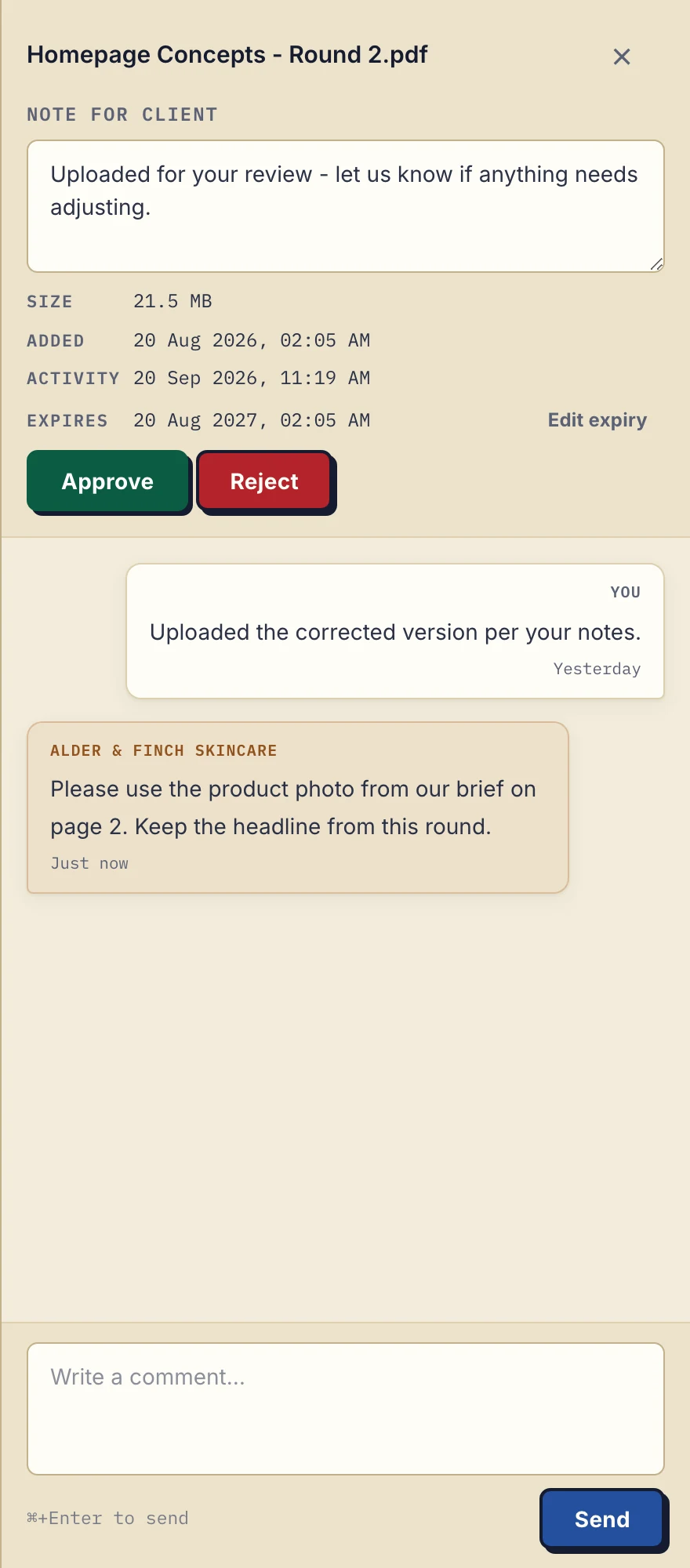
Product demonstration with fictional design data: the same file-note and comment controls can support delivery questions. This is not a photo gallery or proof-selection screen. View the full-size demonstration.
A client can ask for a correction by naming the photo in a comment on the package. For rating many individual images, return to the dedicated proofing tool.
Give the right people access
Clients create no account. In the default Strict mode, they verify their email on a new device; a verified browser is remembered for 90 days. That access period is separate from file retention.
For a corporate event, the business adds the authorized contacts who need access. All contacts in that client portal can see the client's files; there are no per-contact file permissions. Do not use a shared client portal for people who need separate access boundaries.
Relaxed mode is an opt-in that permits permanent access links. Anyone holding such a link can use its access, so do not present forwarding it as the default solution for a guest list. If your existing cloud-drive workflow already meets the recipient and access needs, you may not need another tool.
A delivery message to adapt
The selected photos and caption sheet are ready in your portal. Verify your email if prompted, then download the ZIP and save your copy by [agreed date]. Please comment on the caption sheet with corrections or upload an updated copy here. Gallery selection remains in the proofing service we used earlier.
This is an illustrative message. It states the client's next action and a download deadline without promising permanent storage or an end to resend requests.
Where Droplana fits
Use it for recurring event-client exchange around final files and supporting documents. Solo costs €19/month or €190/year + tax; Practice €49/month or €490/year + tax; Studio €99/month or €990/year + tax. Storage addons cost €15/month or €150/year + tax. Clients do not pay.
Questions before you start
Do all WeTransfer links expire after seven days?
No. Availability depends on the plan and sender settings. The help page checked on 21 September 2026 lists up to three days for Free and Starter and sender-controlled availability on Ultimate. Check the actual transfer’s expiry.
Does Droplana provide photo galleries or proof selection?
No. Use a dedicated proofing tool for galleries, favorites and ratings. Droplana supports final file downloads, supporting documents and file comments.
How long do Free files remain available?
Free files are kept for up to 180 days from upload, subject to earlier expiry or deletion. The client, portal access and Free account do not expire with those files.
Explore Droplana for photographers to try a final delivery and a client reply.