
Client Document Management: Exchange or Full DMS?
Choose a home for client documents, distinguish file exchange from a full DMS, and set clear rules for revisions, access and retention before sharing files.
Product demonstration: Product screenshots use fictional demonstration data; sample requests are illustrative, not measured customer results.

Client document management starts with deciding where documents belong and who maintains them. Use a client portal for the exchange with each client, and keep internal working files and required archives in the systems that handle those jobs.
Choose a client document management approach
- Email: useful for a small, one-off exchange when both sides can find the attachment again. Decide where you will file the record afterwards.
- Shared storage: useful when you need folders and internal working documents. Check the chosen service's permissions, revision history and retention against your requirements.
- Client document portal: useful when documents go both ways repeatedly and the client needs a clear request list, file comments and a place to return.
- Full document management system (DMS): evaluate this separately if you need controlled document lifecycles, record classification, retention rules or formal version management. A portal does not imply these capabilities.
This choice concerns the home for your records. For a firm-wide process, see file sharing for small business clients. Decide which conversations accompany the documents with the client communication guide.
Make the current file explicit
Illustrative naming rule for a monthly report:
Client: [name]. Period: [month/year]. Current document: [report-v2.pdf]. This replaces [report-v1.pdf] for review. Please comment on v2. We keep the earlier copy for context under our agreed retention policy.
Uploading a revision to Droplana creates another file; it does not replace the earlier upload or build a version tree. An Approved or Rejected marker is separate from deciding which file is current. Either side can change or clear that marker.
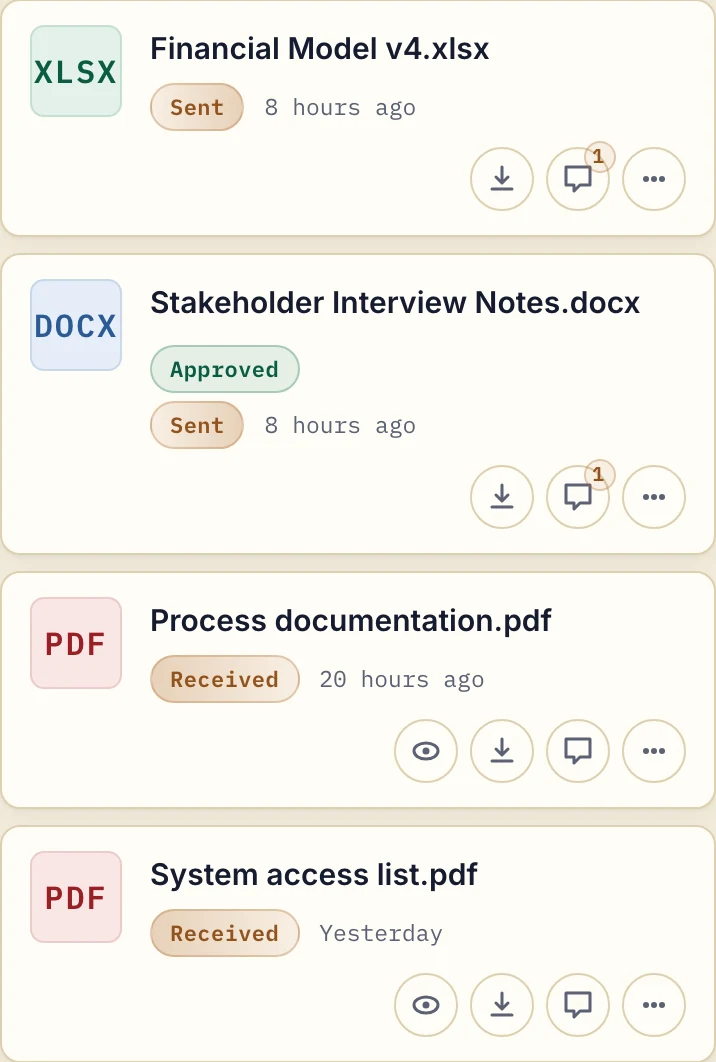
Product demonstration with fictional data. The list organises exchange for one client; it does not demonstrate automatic version or retention management.
Keep the client boundary clear
Droplana gives each client one private, persistent portal for sending documents and receiving files back. Clients do not create accounts or install an app. Strict mode, the default, requires email verification on a new device; a verified browser is remembered for 90 days. A stable portal address is different from a permanent access link, which is available only in Relaxed mode.
Business team members can access client documents. Practice provides 5 business seats including the owner; Studio has unlimited team seats. Do not treat different engagements for the same client as separate access-controlled project workspaces.
Agree what happens at the end
Record who downloads the final documents, how long portal access will remain and where required archives belong. There is no ready-made connector to a named DMS, but an automation tool can connect through Droplana's MCP server, and signed webhooks can tell your own systems when a document arrives. Download activity shows an action, not understanding or acceptance. An expiry setting is not a complete records-retention policy.
Droplana stores files, comments and metadata on Hetzner infrastructure in Germany. A DPA is available on every plan. EU hosting does not replace your own document-handling responsibilities.
Free costs €0 and supports 3 clients, 2 GB total storage, files up to 100 MB and one business owner. Each Free file expires 180 days after upload; the client and portal remain. Solo is €19/month or €190/year plus tax, with unlimited clients, 50 GB total storage, 1 GB files and one business seat. Active paid plans have no plan-imposed retention limit, subject to expiry settings, deletion and cancellation.
For a repeat accounting exchange, the accounting portal page explains the fit and plan choices.
Questions before you start
Does Droplana replace a full DMS?
No. It handles per-client document exchange, checklists, file comments and status markers. It does not provide automatic version management, document editing or a records-retention policy.
Does uploading a revision replace the old file?
No. It creates another file. Name the new revision and tell the client which file to use; an approval marker does not select a current version automatically.
How long are Free files kept?
Each Free file is kept for up to 180 days after upload. The client and portal remain, but a persistent portal address does not make its files permanent.